Level 5: MCP Tools
Give your agents real tools that interact with the world — files, APIs, databases, browsers.
What you'll learn
- Declaring MCP servers in
workspace.yaml— a published one and one you wrote - Writing a stdio MCP server in one Python file
- Permission tiers (
open,cautious,strict,readonly) and declaredeffects - Watching a tool call happen, and watching one be refused
- Sandboxing, environment variables and credentials
The finished workspace is examples/tutorials/05-mcp-tools/. The transcripts are from real runs on
OpenRouter; the weather server runs locally with no key.
What is MCP?
Model Context Protocol is a standard for connecting agents to tools. Instead of building
integrations, you wire existing servers — there are thousands, for GitHub, databases, Slack, file
systems, browsers. A SwarmKit skill with implementation.type: mcp_tool names a server and a tool
on it; the runtime starts the server when a topology needs it and routes every call through
governance.
Build it
1. Write a server
# servers/weather_server.py
# /// script
# dependencies = ["mcp>=1.0,<2"]
# ///
"""A small weather MCP server — one stdio tool, mock data."""

from __future__ import annotations

import json

from mcp.server.fastmcp import FastMCP

server = FastMCP("weather")


@server.tool()
def get_weather(city: str) -> str:
    """Current weather for a city (mock data; a real server would call an API here)."""
    return json.dumps(
        {"city": city, "temperature": "22°C", "condition": "Partly cloudy", "humidity": "65%"}
    )


if __name__ == "__main__":
    server.run()
The # /// script header is what lets uv run servers/weather_server.py install mcp on first
use — your workspace needs no project file. The <2 pin matters: mcp 2.x renamed FastMCP, and
without the pin the server fails to import the day 2.x ships. (It did, while this level was being
checked.)
2. Declare the servers
# workspace.yaml — updated
apiVersion: swarmkit/v1
kind: Workspace
metadata:
  id: my-swarm
  name: My First Swarm
  description: Learning SwarmKit step by step.
governance:
  provider: mock

mcp_servers:
  # A server you wrote: one Python file, launched as a subprocess. `open` — the tool is harmless
  # and local, so calls skip the governance check.
  - id: weather
    transport: stdio
    command: ["uv", "run", "servers/weather_server.py"]
    permission: open

  # A published server, fetched by npx on first start. `readonly` allows only tools declared to
  # read — the ones listed under `effects`; anything else is denied rather than guessed at.
  - id: filesystem
    transport: stdio
    command: ["npx", "-y", "@modelcontextprotocol/server-filesystem", "."]
    permission: readonly
    effects:
      read_file: read
      list_directory: read
Commands run with the workspace root as their working directory, so servers/weather_server.py
and . resolve there.
3. Skills over the tools
# skills/get-weather.yaml
apiVersion: swarmkit/v1
kind: Skill
metadata:
  id: get-weather
  name: Get Weather
  description: Get the current weather for a city.
category: capability
implementation:
  type: mcp_tool
  server: weather          # the id in workspace.yaml
  tool: get_weather        # the tool the server exposes
provenance:
  authored_by: human
  version: 1.0.0
# skills/read-file.yaml
apiVersion: swarmkit/v1
kind: Skill
metadata:
  id: read-file
  name: Read File
  description: Read the contents of a file from the workspace.
category: capability
implementation:
  type: mcp_tool
  server: filesystem
  tool: read_file
provenance:
  authored_by: human
  version: 1.0.0
A skill that names a server the workspace does not declare fails swarmkit validate — the
mismatch is caught at load, not at the first call.
Grant get-weather to the assistant archetype (skills: [summarize, get-weather]) and tell it
when to use it: "When asked about the weather, use the get-weather tool and report what it
returns."
4. Run it
[assistant] thinking... (kimi-k2.5)
--- [assistant] calling moonshotai/kimi-k2.5 ---
  tools: ['summarize', 'get-weather', 'quality-check']
  tool_calls: ['get-weather']
  [assistant] calling get-weather {"city": "Tokyo"}
  executing: get-weather
  [mcp args: {'city': 'Tokyo'}]
  [assistant] got results: get-weather (130B) | waiting for model... (turn 1)
[assistant] done (11.4s)
The weather in Tokyo is currently **22°C** and **partly cloudy**, with **65%** humidity.

── run summary ──
  assistant                root      11447ms
  skills called: 1
The server was started for the run (only servers a topology needs are started), the model called the tool with structured arguments, the result came back, the model answered from it.
5. Watch a call be refused
Add a write-file skill over the filesystem server's write_file and a files topology whose
root has skills: [read-file, write-file]. The server is readonly, and write_file is not in its
effects map:
swarmkit run . files --input "Write 'hi' into scratch.txt using write-file, then tell me what happened." --verbose
  tools: ['read-file', 'write-file']
  tool_calls: ['write-file']
  [reader] calling write-file {"path": "scratch.txt", "content": "hi"}
  executing: write-file
  [reader] got results: write-file (190B) | waiting for model... (turn 1)
[reader] done (10.6s)
I attempted to write 'hi' to scratch.txt, but the operation was **denied**.
The server returned an error indicating that it has a `readonly` permission setting that prevents
write operations. …
No scratch.txt exists afterwards. The refusal reached the model as a tool error it could explain,
and the audit log has the call with policy_decision: deny. Reading works the same way and
succeeds — read_file is declared read.
6. Permission tiers
| Tier | Behaviour |
|---|---|
open |
No governance call — for local, harmless tools |
cautious (default) |
Every call is evaluated by the governance provider with the tool's declared effect |
strict |
Every call needs explicit approval |
readonly |
Only tools declared read (in effects, or by the server's own readOnlyHint) are allowed; write and unknown are denied |
permission_overrides: {list_tables: open} sets one tool's tier; effects says what each tool does,
and is the half you control — it wins over the server's annotation.
7. Sandboxing, env and credentials
mcp_servers:
  - id: untrusted-tool
    transport: stdio
    command: ["python", "some_tool.py"]
    sandboxed: true                     # runs in a container, no network, workspace read-only
    sandbox_image: python:3.11-slim     # optional

  - id: github
    transport: stdio
    command: ["npx", "-y", "@modelcontextprotocol/server-github"]
    env:
      GITHUB_PERSONAL_ACCESS_TOKEN: "{credential.github-token}"   # never the literal

credentials:
  github-token:
    source: env
    config:
      env: GITHUB_TOKEN
{credential.<name>} resolves through the workspace credentials block at launch and keeps the
secret out of the runtime's own environment. ${VAR} and ${VAR:-default} interpolate from the
environment in every artifact (Environment configuration). The
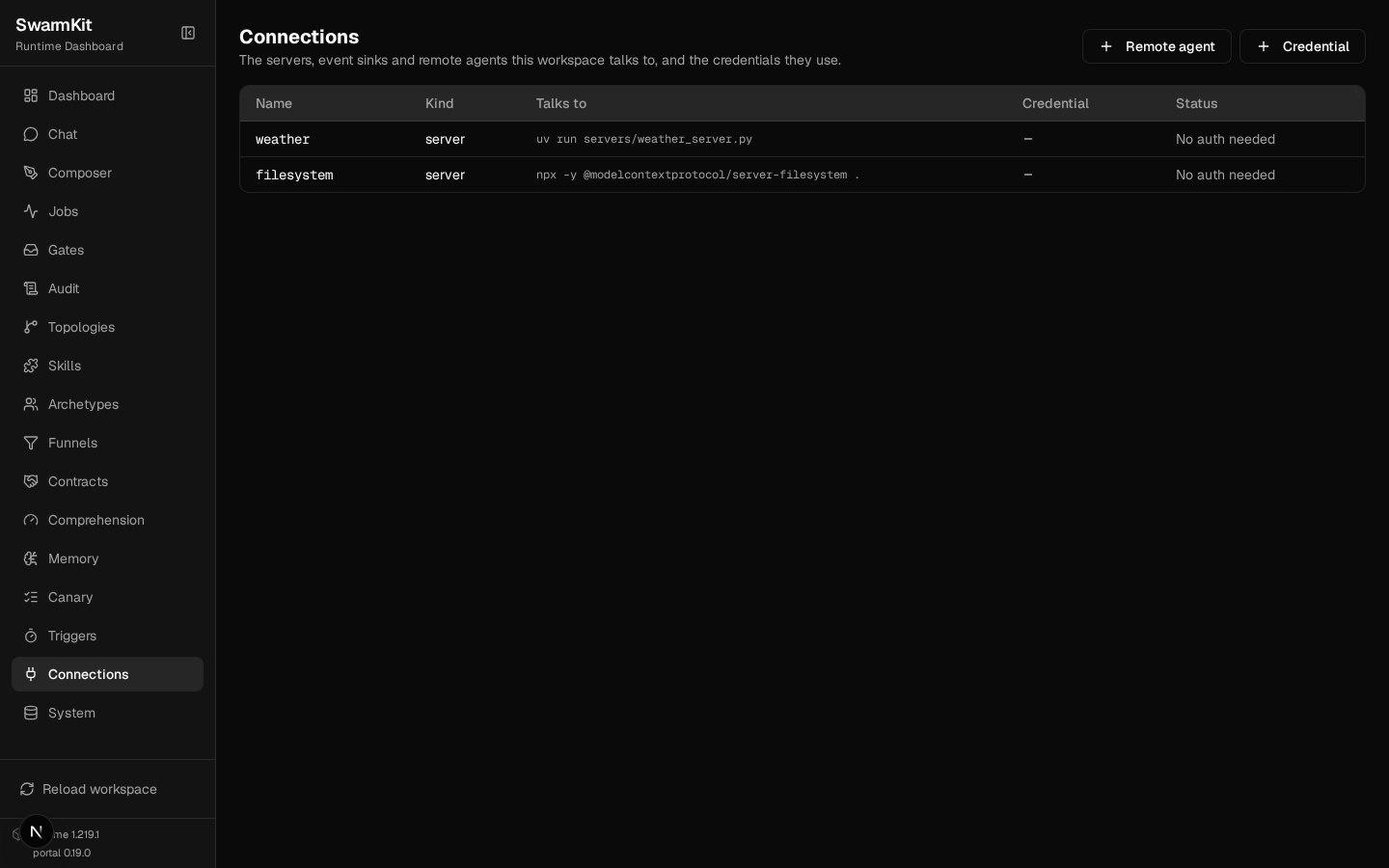
portal's Connections page shows every server, what it talks to, and whether its credential
resolves:
Your workspace so far
my-swarm/
├── workspace.yaml          # now has mcp_servers
├── archetypes/
├── servers/
│   └── weather_server.py
├── skills/
│   ├── get-weather.yaml
│   ├── read-file.yaml
│   ├── write-file.yaml
│   └── ...
└── topologies/
    ├── files.yaml
    └── ...
Next
Level 6: Structured Delegation — task plans, scopes, and the dual model pattern.