Level 9: Conversations & Memory
Agents that hold a conversation, remember what earlier runs learned, and treat the facts a person curated as established.
What you'll learn
- Multi-turn chat with
swarmkit chat, resuming, and the same conversation in the portal - Workspace memory: what a run remembered by itself (
memory-reader/memory-writer) - Governed memory: facts that are reconciled on write, quarantined on conflict, and resolved by
a person —
swarmkit memory, thegoverned-memoryskill, the Memory page - Where all of it is stored
The finished workspace is examples/tutorials/09-conversations-memory/ — Level 8 plus two
bindings, two skill files and one topology. Every transcript is a real run on OpenRouter.
There are two memories
| workspace memory | governed memory | |
|---|---|---|
| what it holds | {topic, context, key_points, tags} — a summary of a turn |
{subject, attribute, value} — one fact |
| written by | memory-writer, automatically, after a run |
the governed-memory skill, swarmkit memory add, POST /memory |
| reviewed | no | reconcile-on-write; a contradiction is quarantined for a person |
| read by | memory-reader, before a run |
memory-reader, before a run — curated facts first |
| CLI / UI | — | swarmkit memory search / get / quarantine / resolve; Memory page |
Both live in the workspace's configured store (storage.runtime — SQLite in .swarmkit/ by
default, Postgres when you say so), like jobs, the audit log and conversations. Nothing here is a
file you have to back up separately.
Part 1 — workspace memory
1. It is already on
There is nothing to bind. Since runtime 1.233.0 memory is on by default: memory-reader runs
before every agent and memory-writer after, both advisory (required: false — a memory that
cannot be read or written costs the context, never the run), and the two governed-memory skills
of Part 2 are bundled. A workspace that never mentions memory remembers. The knobs, and the
off switch, live in one block:
# workspace.yaml — optional; absent means exactly this
memory:
  enabled: true
  reader:
    max_results: 5
    similarity_threshold: 0.15
    search_scope: all           # user | all | both
  writer:
    min_output_length: 100      # greetings are not worth remembering
memory-writer is one model call per run whose answer clears min_output_length — the price of
remembering, paid by default. Raise the threshold before you reach for enabled: false. If you
bind memory-reader or memory-writer yourself under governance.decision_skills (a narrower
scope, say), your binding is used as written and the automatic one for that id is skipped;
binding one next to enabled: false is a resolution error, not a coin toss.
reachability: 2 declared, all wired
  decision_skill 'hello:memory-reader:pre_input' declared on topology hello — at pre_input: wired
  decision_skill 'hello:memory-writer:post_output' declared on topology hello — at post_output: wired
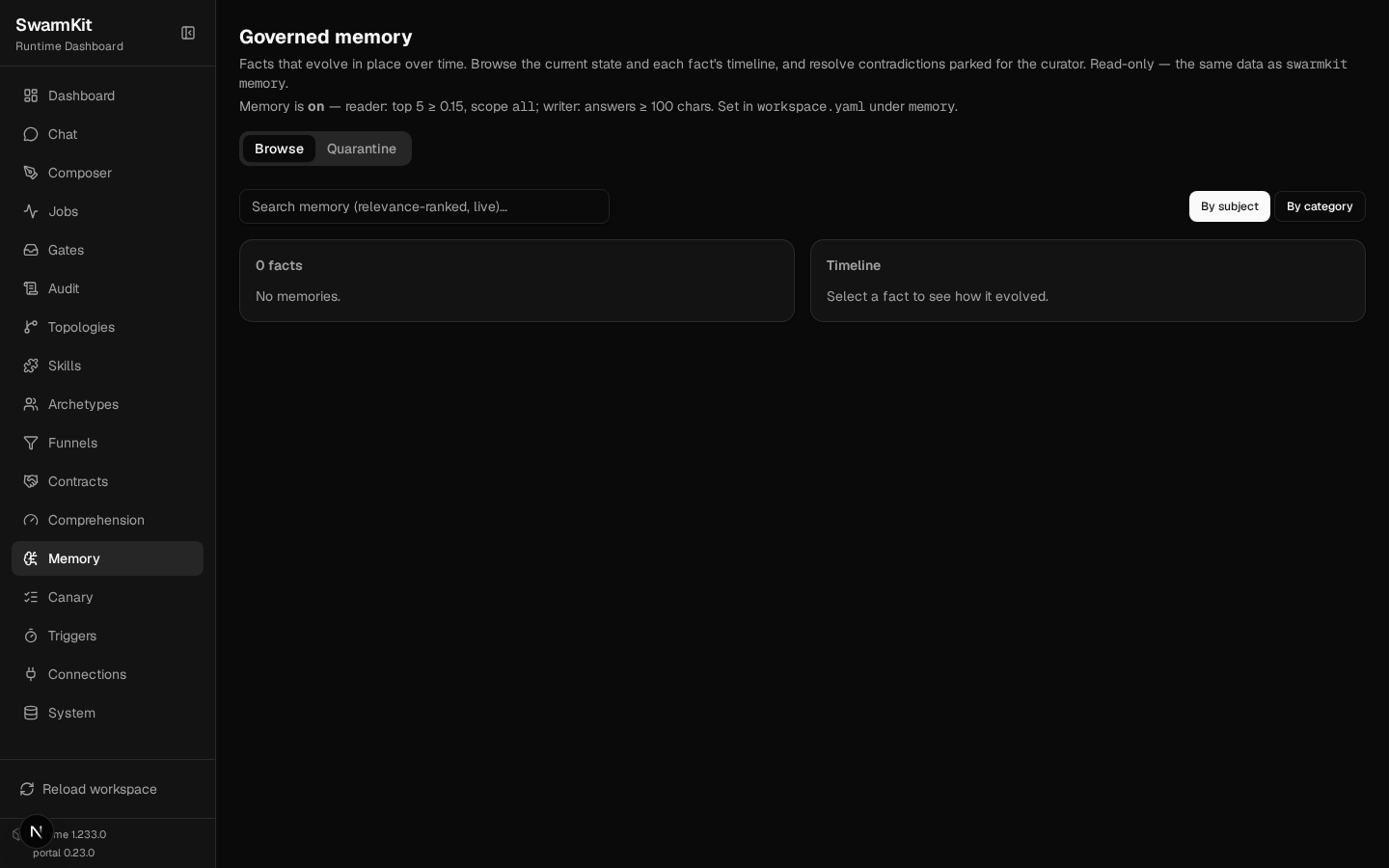
The portal's Memory page says what is in force (GET /memory/config is the same data):
2. A run that is worth remembering
swarmkit run . hello --input "I'm planning a two-week trip to Japan in November — Tokyo, Kyoto and Kanazawa. What should I know about the weather and what to pack?"
[assistant] thinking... (kimi-k2.5)
  [assistant] calling get-weather {"city": "Tokyo"}
  [assistant] calling get-weather {"city": "Kyoto"}
  [assistant] calling get-weather {"city": "Kanazawa"}
  [assistant] got results: get-weather (130B), get-weather (130B), get-weather (133B) | waiting for model... (turn 1)
[assistant] done (50.2s)
Great question! I checked the current weather for all three cities, but since you're traveling in
**November**, let me share what to typically expect during that month, along with packing tips.
…
After the answer, memory-writer asked a model whether the turn was worth keeping and what to keep.
This is what it stored — topic, context, key_points, tags, extracted by the model, not
copied:
{
  "id": "mem-20260917T131924-0",
  "topic": "Japan travel planning - November weather and packing",
  "context": "User is planning a two-week trip to Japan in November visiting Tokyo, Kyoto, and Kanazawa. They wanted to know what weather to expect and what clothing/gear to pack for those conditions.",
  "key_points": [
    "November is cool autumn weather: Tokyo/Kyoto highs ~17°C (63°F), lows ~8-10°C; Kanazawa slightly cooler at 15-16°C days, 7°C nights",
    "Kanazawa is damper and more prone to rain/cloud cover due to Sea of Japan location",
    "Layering is essential: medium-weight jacket, sweaters, thermal base layers for Kanazawa and evenings",
    "Late November brings peak autumn foliage; generally dry and sunny in Tokyo/Kyoto"
  ],
  "tags": ["travel", "japan", "tokyo", "kyoto", "kanazawa", "november", "packing", "weather"],
  "source_agent": "assistant"
}
3. A later run that needs it
A different run, a different day, no conversation history:
SWARMKIT_VERBOSE=1 swarmkit run . hello --input "Remind me — where was I planning to go, and when?" --verbose
  [assistant] memory context injected
--- [assistant] calling moonshotai/kimi-k2.5 ---
  input: WORKSPACE MEMORY — relevant prior conversations for this user:
Topic: Japan travel planning - November weather and packing
Context: User is planning a two-week trip to Japan in November visiting Toky...
[assistant] done (13.5s)
As we discussed previously, you're planning a two-week trip to Japan in November, visiting Tokyo,
Kyoto, and Kanazawa.
memory-reader searched the store with the input, found the entry, and prepended it to what the
agent sees — with an instruction to use it as its own recollection rather than announce a
database. Search is lexical: the score is how much of the question's content words the memory
covers (similarity_threshold: 0.15 = at least 15% of them). "Remind me — where was I planning
to go" scores 0.40 against that entry; "how do I cook rice" scores 0.
4. The same thing as a conversation
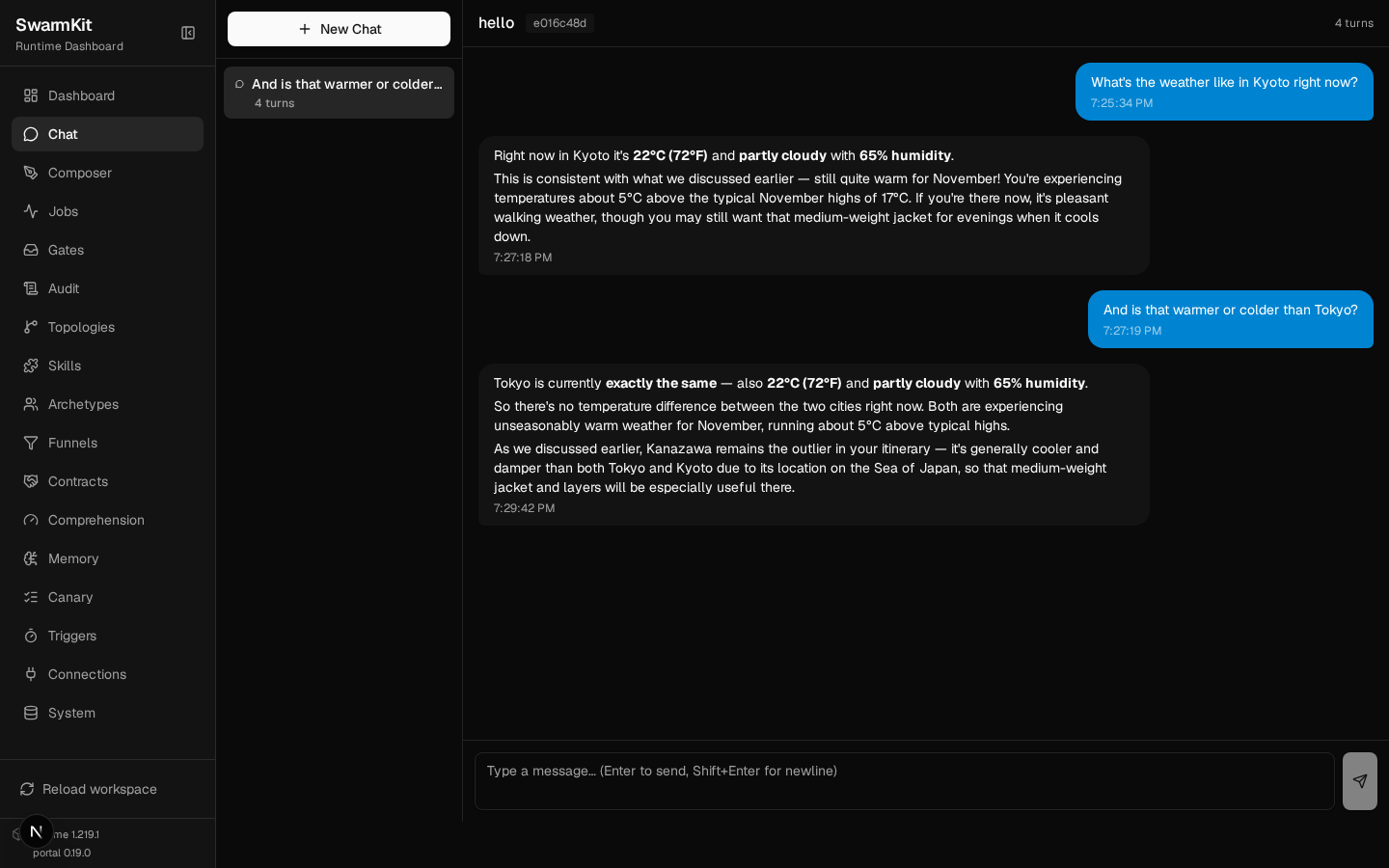
swarmkit chat keeps the turns of one conversation together and hands the whole history to the
topology on every turn — the swarm sees a longer input, not a special mode:
> What's the weather like in Kyoto right now?
  [assistant] memory context injected
  [assistant] calling get-weather {"city": "Kyoto"}
[assistant] done (19.5s)
Right now in Kyoto it's **22°C (72°F)** and **partly cloudy** with **65% humidity**.

This is consistent with what we discussed earlier — still quite warm for November! …

> And is that warmer or colder than Tokyo?
  [assistant] calling get-weather {"city": "Tokyo"}
[assistant] done (17.6s)
Tokyo is currently **exactly the same** — also **22°C (72°F)** and **partly cloudy** …

As we discussed earlier, Kanazawa remains the outlier in your itinerary …

> exit

Conversation saved: e016c48d
Resume with: swarmkit chat ... --resume e016c48d
Inside a chat: exit / quit / /quit end it, /clear starts the context over (MCP servers
stay up), /model <provider/model> switches the model for the rest of the session. Conversations
are listed and resumed by id or prefix:
Recent conversations:
  1. [e016c48d] hello (4 turns)
     "And is that warmer or colder than Tokyo?"
     2026-09-17T13:59:42

Resume with: swarmkit chat <workspace> <topology> --resume <id>
Or use: swarmkit conversations <workspace> --pick
Every turn is a job (Source: chat in Jobs, linked by the conversation id), and the portal's
Chat page is the same conversation store — a chat started from the CLI continues in the browser:
4b. Switching it off
The same second question on a copy of the workspace with memory switched off:
[assistant] done (5.1s)
Could you share those details with me? I'd be happy to help you with information about your destination—like checking the weather there if you'd like!
No memory context injected, nothing recalled, and swarmkit validate --require lists no memory
bindings. One more thing the flag does: it stops bundling the governed-memory skills of Part 2, so
a topology that grants governed-memory (the tutor below) no longer resolves —
error: Agent 'tutor' references skill 'governed-memory' which is not defined in this workspace.
  try   Define a skill with id='governed-memory' under skills/, or change the reference to an existing one.
— which is the right answer: a workspace with memory off should not have an agent that writes it.
Copy the skill into skills/ if you want governed memory without the automatic reader and writer.
Part 2 — governed memory
Workspace memory is whatever a run happened to record. Some facts deserve more: a correction a person made, a decision that should not be re-litigated. Governed memory is curated — every write is reconciled against what is already there, a contradiction is quarantined instead of applied, and resolving one is a human action.
5. It is on too — writing is the grant
The two skills behind governed memory ship with the runtime and are loaded unless your workspace
defines its own (a copy in skills/ wins):
governed-memory(category: persistence) — the skill an agent calls to propose facts. Its presence is what builds the store.memory-reconcile(category: decision) — the judge for a changed value:update(supersede),refine(merge the detail in) orcontradict(quarantine). New keys and identical restatements are handled deterministically, without a model.
Reading needs nothing: memory-reader renders curated facts first. Writing is a grant, made
deliberately, per agent:
# topologies/tutor.yaml
apiVersion: swarmkit/v1
kind: Topology
metadata:
  name: tutor
  version: 0.1.0
  description: A single assistant that can write governed memory.
agents:
  root:
    id: tutor
    role: root
    archetype: friendly-assistant
    skills_additional:
      - governed-memory    # write access to curated memory — grant deliberately
6. An agent proposes facts
swarmkit run . tutor --input "Two things to remember about me: I'm vegetarian, and my home airport is Bengaluru (BLR)."
--- [tutor] calling moonshotai/kimi-k2.5 ---
  tools: ['summarize', 'get-weather', 'governed-memory']
  tool_calls: ['governed-memory']
  [tutor] calling governed-memory {"input": "User is vegetarian and their home airport is Bengaluru (BLR)."}
  executing: governed-memory
  [tutor] got results: governed-memory (346B) | waiting for model... (turn 1)
[tutor] done (29.8s)
Got it! I've noted that you're vegetarian and your home airport is Bengaluru (BLR). I'll keep that
in mind for future conversations.
The skill turned the sentence into candidates and wrote each through the governed path; the tool
result told the agent what happened to them (2 candidate(s) written: 2 new), which is why it can
say "noted" truthfully.
  user · home_airport = Bengaluru (BLR)
      type=profile confidence=1.00 reinforced x1
  user · dietary_preference = vegetarian
      type=profile confidence=1.00 reinforced x1
7. A person refines, and something contradicts
swarmkit memory add writes through the same path an agent writes through — reconcile included:
The judge read the current value and the proposal and decided the new detail belongs with the old, not instead of it. Now a bad import asserts something else:
contradict  user/home_airport — NOT written; quarantined for review
  the trusted memory is unchanged. Resolve with: swarmkit memory resolve <id>
The command exits non-zero: a contradiction is not a success, and a seeding script must not read it as one. The trusted value stands until a person decides:
  #1  user::home_airport
      proposed: 'Chennai (MAA)'  vs current: 'Bengaluru (BLR); prefers morning departures'
      The proposal directly conflicts with a firmly-held home airport memory at confidence 1.00;
      without evidence of relocation, overwriting Bengaluru (BLR) with Chennai (MAA) requires
      human curation.
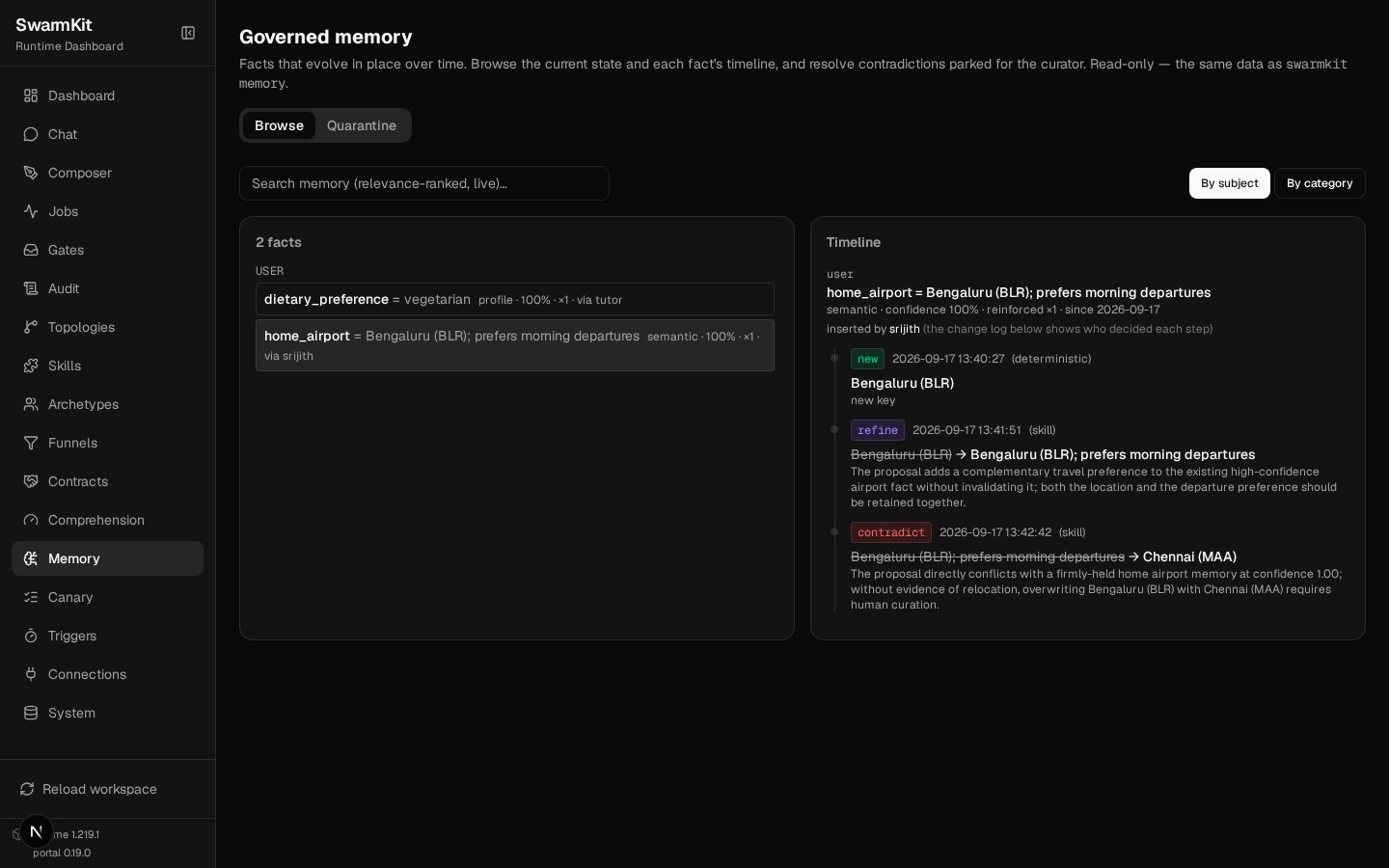
Every step is in the fact's append-only history — who decided, deterministic or skill:
  user · home_airport = Bengaluru (BLR); prefers morning departures
      type=semantic confidence=1.00
    2026-09-17T13:40:27  new       ∅ → Bengaluru (BLR)  (deterministic)
    2026-09-17T13:41:51  refine    Bengaluru (BLR) → Bengaluru (BLR); prefers morning departures  (skill)
    2026-09-17T13:42:42  contradict Bengaluru (BLR); prefers morning departures → Chennai (MAA)  (skill)
The Memory page is the same data: browse by subject, click a fact for its timeline, and the Quarantine tab is where a curator resolves in the browser:
8. A curated fact reaches an agent
Any agent under the memory-reader binding — no write grant needed:
SWARMKIT_VERBOSE=1 swarmkit run . hello --input "I'm flying to Tokyo next month — which airport do I leave from, and what should I keep in mind about food?" --verbose
  [assistant] memory context injected
--- [assistant] calling moonshotai/kimi-k2.5 ---
  input: <curated-memory>
Established facts for this workspace:
- user · home_airport: Bengaluru (BLR); prefers morning departures
</curated-memory>
I'm flying to Tokyo next month — which airport do I leave f...
[assistant] done (14.5s)
Based on your profile, you leave from **Bengaluru (BLR)** — and since you prefer morning departures,
aim for flights that depart in the AM to match your preference.
…
Curated facts arrive in a labelled, delimited block before workspace memory, because they went
through review and workspace memory did not. Retrieval is by relevance to the input, so a fact is
injected when the question is about it — dietary_preference did not match this question's words
and was not included; ask about food by name and it is.
Where it all lives
my-swarm/
├── workspace.yaml               # nothing memory-specific — or a `memory:` block to tune / switch off
├── topologies/
│   ├── tutor.yaml               # holds governed-memory (bundled with the runtime; a skills/ copy wins)
│   └── ...
└── .swarmkit/
    └── store.sqlite             # jobs, conversations, workspace memory, governed memory —
                                 # or Postgres, when `storage.runtime` says so (Level 21)
One store, resolved once from storage.runtime. Conversations, workspace memory and governed
memory are tables in it, next to jobs and usage; point the workspace at Postgres and all of them
move together.
Next
Level 10: Knowledge & RAG — give your agents a knowledge base.