Level 12: Triggers & Canary Deployments
Runs that start themselves — on a schedule, or when something outside calls — and a new version of a topology that earns its traffic before it gets all of it.
What you'll learn
- Cron triggers: an expression, a timezone, an input
- Webhook triggers: a signed
POST /hooks/{topology}that starts a run - Two versions of one topology, side by side on disk
- Canary routing by weight, metrics per version, automatic promotion
- Manual promote and rollback (and why they need
admin)
The finished workspace is examples/tutorials/12-triggers-canary/ — Level 11 plus a triggers/
directory, a second hello, and a canary block. Everything below ran against a real serve.
Triggers
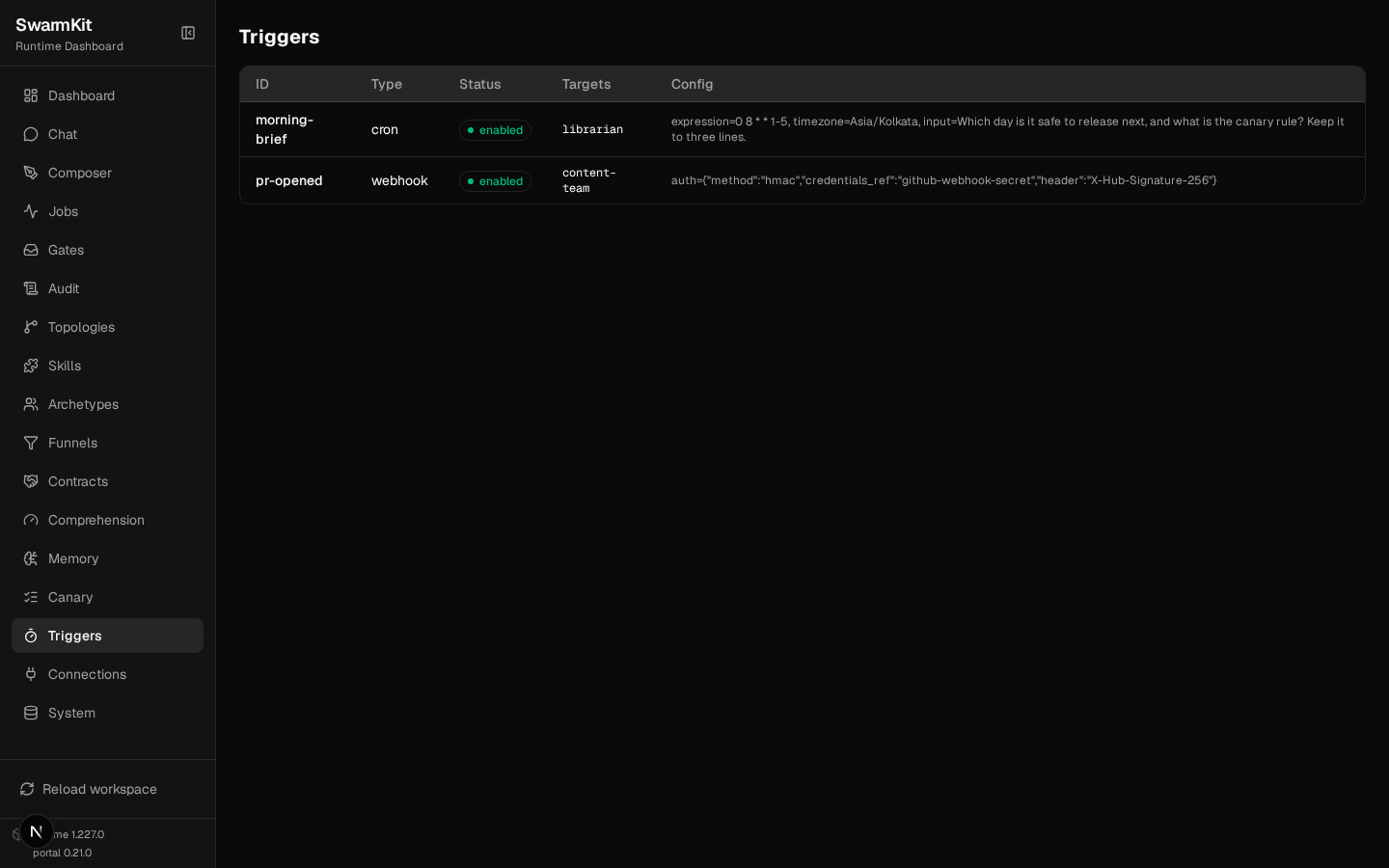
Triggers live in triggers/, one file each, and the scheduler inside swarmkit serve runs them.
A trigger names its targets (topologies to run) and carries type-specific config.
1. A cron trigger
# triggers/morning-brief.yaml
apiVersion: swarmkit/v1
kind: Trigger
metadata:
  id: morning-brief
  name: Morning brief
  description: Every weekday at 08:00 IST, ask the librarian for the day's release status.
type: cron
targets:
  - librarian
config:
  expression: "0 8 * * 1-5"    # standard five-field cron
  timezone: Asia/Kolkata
  input: "Which day is it safe to release next, and what is the canary rule? Keep it to three lines."
expression is evaluated in timezone; input is what the run is asked. Start serve and the
scheduler picks it up:
A fired trigger is an ordinary job — it goes through the same path as POST /run, so it gets the
canary version below, the capacity limit, and a row in the history with its source:
(That one was a * * * * * trigger added for the demonstration and removed again — the
morning-brief above fires at 08:00 IST, which is the point.)
2. A webhook trigger
# triggers/pr-opened.yaml
apiVersion: swarmkit/v1
kind: Trigger
metadata:
  id: pr-opened
  name: PR opened
  description: A GitHub webhook — a signed POST starts a content-team run.
type: webhook
targets:
  - content-team
config:
  auth:
    method: hmac
    credentials_ref: github-webhook-secret   # a workspace `credentials` entry — a reference, never the literal
    header: X-Hub-Signature-256              # GitHub's signing header (the default for hmac)
# workspace.yaml — the credential it refers to
credentials:
  github-webhook-secret:
    source: env
    config:
      env: GITHUB_WEBHOOK_SECRET
The route is POST /hooks/<target topology>. The caller cannot hold a serve API key (GitHub does
not), so a webhook trigger that declares config.auth is admitted past the API-key gate and
verified by its own method instead — and one that declares none stays behind the gate.
BODY='{"action": "opened", "pull_request": {"number": 42, "title": "Add retry to the uploader"}}'
SIG=$(printf '%s' "$BODY" | openssl dgst -sha256 -hmac "$GITHUB_WEBHOOK_SECRET" | awk '{print $2}')

curl -s -X POST localhost:8000/hooks/content-team -H 'content-type: application/json' -d "$BODY"
curl -s -X POST localhost:8000/hooks/content-team -H 'content-type: application/json' \
  -H "X-Hub-Signature-256: sha256=$SIG" -d "$BODY"
{"detail":"Invalid webhook signature"}   401
{"job_id": "cf2e80f2b187", "status": "pending", "topology": "content-team",
 "input": "{\"action\": \"opened\", \"pull_request\": {\"number\": 42, \"title\": \"Add retry to the uploader\"}}"}
A body with an input field is passed as that string; any other JSON body is passed as JSON text.
A credentials_ref whose secret is not set refuses the delivery (503) rather than accepting it
unsigned.
method |
Checks |
|---|---|
hmac |
sha256=<hex> over the body in header (default X-Hub-Signature-256) — GitHub, Gitea, most CI |
bearer |
Authorization: Bearer <secret> |
api_key |
the secret itself in header (default X-API-Key) |
The Triggers page lists them:
Canary deployments
3. Two versions of one topology
Put every version of a topology in a subdirectory named after it. Same metadata.name, different
metadata.version; the file named after the topology is the one hello means by default:
topologies/hello/
├── hello.yaml           # metadata.version: 0.3.0 — `hello`, and `hello@0.3.0`
└── hello-v0.4.0.yaml    # metadata.version: 0.4.0 — `hello@0.4.0`
# topologies/hello/hello-v0.4.0.yaml
apiVersion: swarmkit/v1
kind: Topology
metadata:
  name: hello              # same name as hello.yaml — a second VERSION of it, not a second topology
  version: 0.4.0
  description: The canary candidate — the assistant answers with a one-line source note.
agents:
  root:
    id: assistant
    role: root
    archetype: friendly-assistant
    prompt:
      system: |
        You are a friendly, helpful assistant. Answer clearly and concisely, then end with one
        line starting "Source:" that says where the answer came from (a tool, or general knowledge).
    skills_additional:
      - quality-check
    intent_monitoring:
      enabled: true
      threshold: 0.75
      on_drift: warn
topologies: 12 (analysis, content-team, explain, files, hello, hello@0.3.0, hello@0.4.0, librarian, …)
swarmkit run . hello@0.4.0 --input … runs a specific version directly.
4. Route by weight
# workspace.yaml — under server:
  canary:
    routes:
      - topology: hello
        versions:
          - version: "0.3.0"
            weight: 80
          - version: "0.4.0"
            weight: 20
            promote_when:
              min_runs: 5              # promote after 5 runs of 0.4.0 …
              error_rate_below: 0.2    # … with under 20% failures …
              drift_below: 0.9         # … and a mean drift score under 0.9
              window_minutes: 60
Now POST /run/hello picks a version per request. Eight submissions:
a45975a7338a version 0.3.0
cefde238ef67 version 0.3.0
d325e468c07d version 0.4.0
66206070d7a4 version 0.3.0
52ff28a1d9dc version 0.4.0
c8fb25fcf090 version 0.3.0
991828991615 version 0.3.0
aaa5ad560dcc version 0.4.0
Each job records which version it ran (version on the job, in the history, in the portal). A
0.4.0 answer:
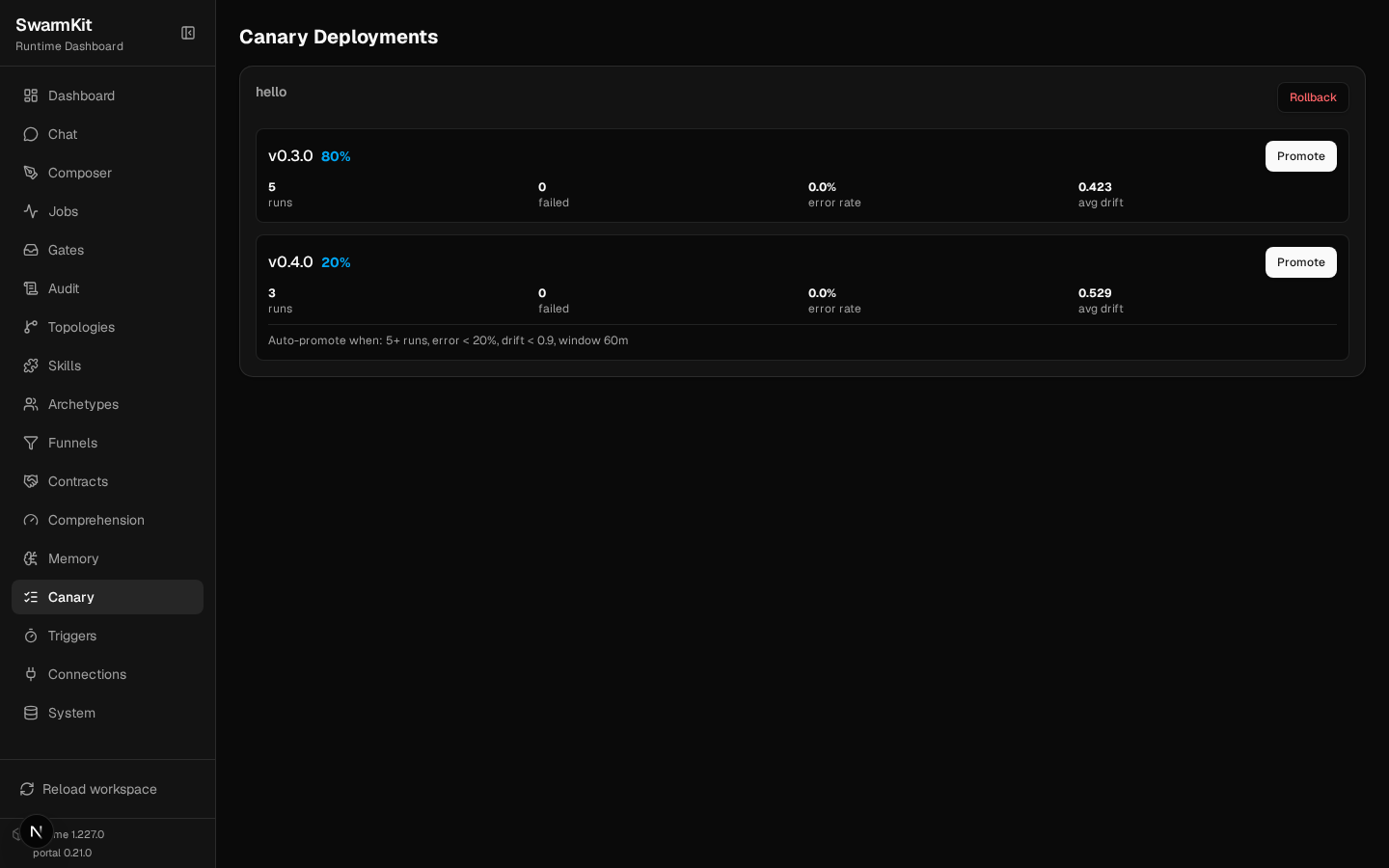
5. Metrics per version
{
  "routes": [{
    "topology": "hello",
    "versions": [
      {"version": "0.3.0", "weight": 80,
       "metrics": {"total_runs": 5, "failed_runs": 0, "error_rate": 0.0, "avg_drift": 0.4226}},
      {"version": "0.4.0", "weight": 20,
       "metrics": {"total_runs": 3, "failed_runs": 0, "error_rate": 0.0, "avg_drift": 0.5286},
       "promote_when": {"min_runs": 5, "error_rate_below": 0.2, "drift_below": 0.9, "window_minutes": 60}}
    ]
  }],
  "promotions": []
}
error_rate is failed runs over runs in the window; avg_drift is the mean of the
intent.drift scores the version's runs recorded (Level 8) — so the canary criterion can say
"the new prompt must not wander more than the old one".
6. Promotion
Two more runs later, 0.4.0 reached five and met the criteria. The router promoted it on the spot:
{
  "routes": [{"topology": "hello", "versions": [
    {"version": "0.3.0", "weight": 0,   "metrics": {"total_runs": 13, …}},
    {"version": "0.4.0", "weight": 100, "metrics": {"total_runs": 5, "error_rate": 0.0, "avg_drift": 0.5286}, …}
  ]}],
  "promotions": [{
    "topology": "hello",
    "promoted_version": "0.4.0",
    "old_weights": "{'0.3.0': 80, '0.4.0': 20}",
    "metrics": "runs=5, error_rate=0.000, avg_drift=0.529",
    "timestamp": "2026-09-17T15:26:02.724791+00:00"
  }]
}
By hand — both need the admin tier (a run token gets 403 Insufficient scope: requires
serve:admin):
curl -s -X POST -H "Authorization: Bearer $OPS_TOKEN" localhost:8000/canary/hello/promote \
  -H 'content-type: application/json' -d '{"version": "0.4.0"}'
curl -s -X POST -H "Authorization: Bearer $OPS_TOKEN" localhost:8000/canary/hello/rollback
{"promoted":true,"topology":"hello","version":"0.4.0"}      → weights 0.3.0: 0, 0.4.0: 100
{"rolled_back":true,"topology":"hello"}                      → weights 0.3.0: 100, 0.4.0: 0
Rollback sends everything to the first listed version. Both are runtime decisions: weights live in
the running server and go back to workspace.yaml's numbers on restart. When a canary has won,
make it the stable version in the file — rename the files, or make 0.4.0 the first entry with
weight 100 — and drop the route.
Your workspace so far
my-swarm/
├── workspace.yaml               # server.canary, credentials.github-webhook-secret, an admin key
├── triggers/
│   ├── morning-brief.yaml       # cron
│   └── pr-opened.yaml           # webhook, hmac
└── topologies/
    └── hello/
        ├── hello.yaml           # 0.3.0
        └── hello-v0.4.0.yaml    # 0.4.0
Next
Level 13: Authoring & Review — create artifacts by describing them, and review what a swarm proposes.