Level 13: Authoring & Review¶
Twelve levels of YAML by hand. This is the level where you describe what you want and the runtime writes it — and where the runtime tells you what it is missing.
What you'll learn¶
swarmkit author skill|topology|archetype|mcp-server— one agent, a conversation, a fileswarmkit init— a workspace from a descriptionswarmkit editand--thorough— the skill-authoring swarm, and what it needsswarmkit skill search|add|import|check— the catalogue, and Agent Skills files- The skill gap log: how a workspace learns what it lacks (
swarmkit gaps) - The review queue: what lands there and how you answer it
The finished workspace is examples/tutorials/13-authoring-review/ — Level 12 plus a skill and a
topology that were not typed. Every transcript is a real session on OpenRouter.
Authoring is a conversation¶
Every authoring command is the same loop: you describe, the agent asks what it needs to know, proposes a plan, and writes files only after you approve — then validates the workspace with them in place. It never edits YAML behind your back; it shows the plan first.
1. Author a skill¶
SwarmKit skill authoring — let's build your swarm.
Model: moonshotai/kimi-k2.5
Workspace: …/13-authoring-review

> A skill called translate-text: an llm_prompt skill that translates the text it is given into
  the language named in the request, keeping the formatting. Category capability.

Great idea — a translation skill is a clean addition to the swarm. Before I generate the YAML,
two quick clarifying questions:
1. **Source language**: Should the skill auto-detect the source language from the text, or will
   the caller always provide the source language explicitly?
2. **Output style**: Should the skill emit **only** the translated text (no preambles like
   "Here is the translation…"), or is a short wrapper acceptable?

> Any language, named in the request. Keep markdown formatting. Plain translated text out,
  nothing else. Write it.

I'll create these files:
  skills/translate-text.yaml
Create these files?
[Y/n] > y
Wrote 1 files: skills/translate-text.yaml. valid — 12 topologies, 21 skills, 7 archetypes, 0 errors.
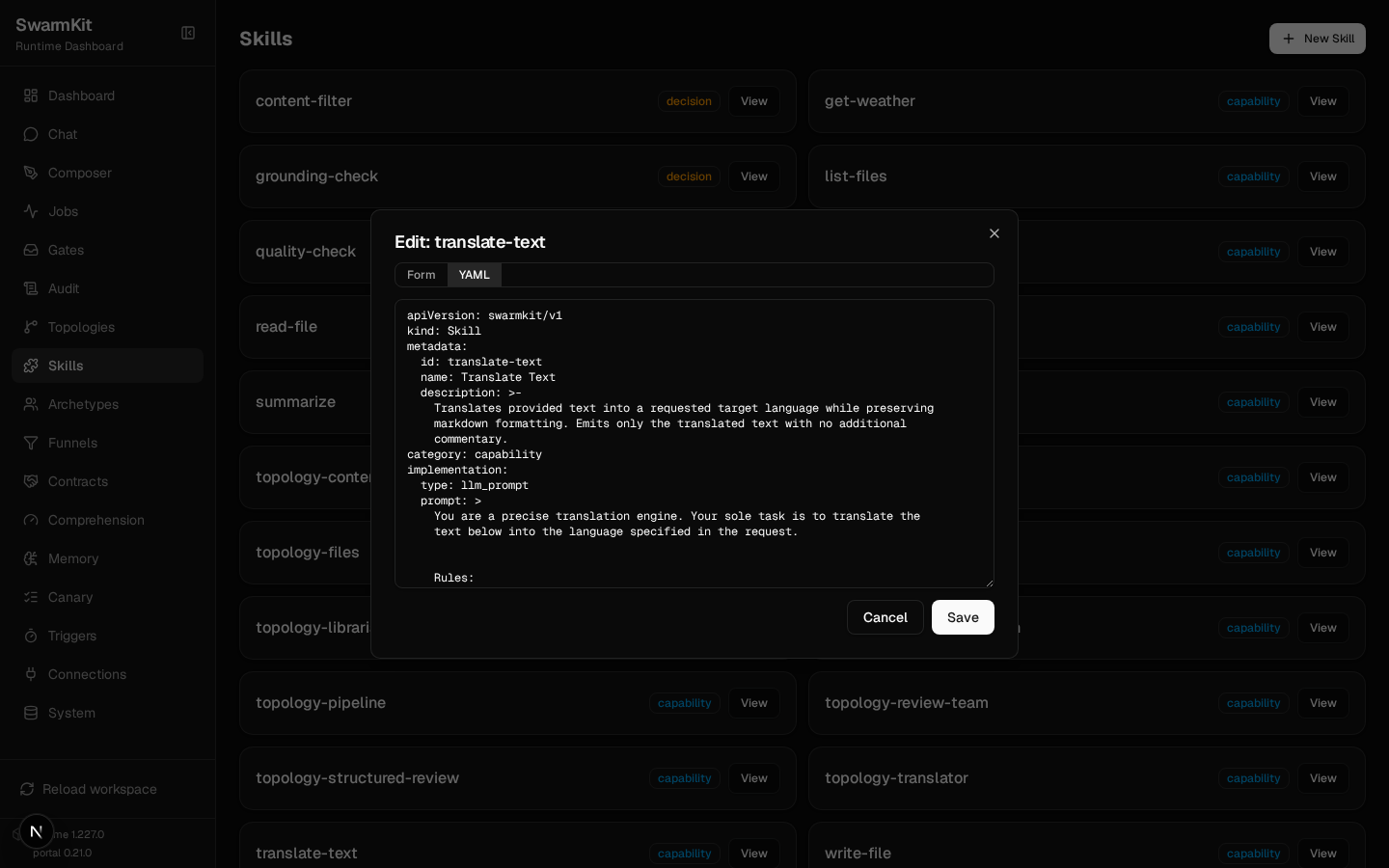
The file it wrote — a real llm_prompt skill, schema-valid, with a prompt that encodes the two
answers:
# skills/translate-text.yaml — written by `swarmkit author skill`
apiVersion: swarmkit/v1
kind: Skill
metadata:
  id: translate-text
  name: Translate Text
  description: Translates provided text into a requested target language while preserving markdown formatting. Emits only the translated text with no additional commentary.
category: capability
implementation:
  type: llm_prompt
  prompt: |
    You are a precise translation engine. Your sole task is to translate the text below into the language specified in the request.

    Rules:
    - Detect the source language automatically.
    - Translate into the requested target language exactly as named.
    - Preserve all markdown formatting, including headings, lists, links, code blocks, tables, and emphasis.
    - Do not add any preamble, explanation, notes, or surrounding markdown code fences unless the original text contained them.
    - Output ONLY the translated text.
provenance:
  authored_by: human
  version: 1.0.0
authored_by: human is right: you approved it. The agent drafts; a person publishes (design
§12). It is an ordinary file from here — the portal's Skills page opens it as a form or as
YAML like any other:
2. Author a topology that uses it¶
> A topology called translator: a single root agent with id translator using the
  friendly-assistant archetype, with the translate-text skill added via skills_additional. Its
  system prompt override: translate whatever the user sends into the language they name, using
  the translate-text skill.

  root:
    id: translator
    role: root
    archetype: friendly-assistant
    skills_additional:
      - translate-text
    prompt:
      system: "Translate whatever the user sends into the language they name, using the translate-text skill."

**Questions before I generate:**
1. Would you like **intent drift monitoring** enabled?
2. Any **model override** (provider/name), or use the archetype's defaults?

> That's right. Write it.

Create these files?
[Y/n] > y
Wrote 1 files: topologies/translator.yaml. valid — 13 topologies, 22 skills, 7 archetypes, 0 errors.
It knew the workspace: friendly-assistant exists, translate-text was written a minute ago,
skills_additional is the right key. And it runs:
swarmkit run . translator --input "Into French: **Release notes** — the uploader now retries three times before giving up."
  tools: ['summarize', 'get-weather', 'translate-text']
  [translator] calling translate-text {"input": "Release notes — the uploader now retries three times before giving up."}
[translator] done (69.9s)
Notes de version — le téléchargeur réessaie maintenant trois fois avant d'abandonner.
swarmkit author archetype . and swarmkit author mcp-server . are the same conversation for
the other two kinds (the latter writes a Python server file plus its mcp_servers entry).
3. A workspace from nothing¶
> A swarm that reads a support ticket and drafts a reply: one root agent, OpenRouter, model
  moonshotai/kimi-k2.5, no tools yet. Keep it minimal.

I'll create these files:
  topologies/support.yaml
  workspace.yaml
Create these files?
[Y/n] > y
Wrote 2 files: workspace.yaml, topologies/support.yaml. valid — 1 topologies, 1 skills, 0 archetypes, 0 errors.
fresh/
├── workspace.yaml            # mock governance, sqlite checkpoints
├── workspace.env.yaml        # machine-specific values go here, not in workspace.yaml
└── topologies/
    └── support.yaml          # one root agent, kimi-k2.5, a support-reply system prompt
swarmkit run fresh support --input "I've reset my password three times and never get the email."
runs it. Minimal was the request; a fuller description gets archetypes and skills too — the plan
is shown before anything is written, and "no" sends you back to the conversation.
Take one from the catalogue¶
Not every skill needs writing. swarmkit-skills
is a catalogue of MCP servers with the config already worked out and checked nightly — the
mcp_servers block, the permission tier, an effects map per tool — and swarmkit skill is the
command over it (runtime 1.235.0; the portal tab, 1.236.0).
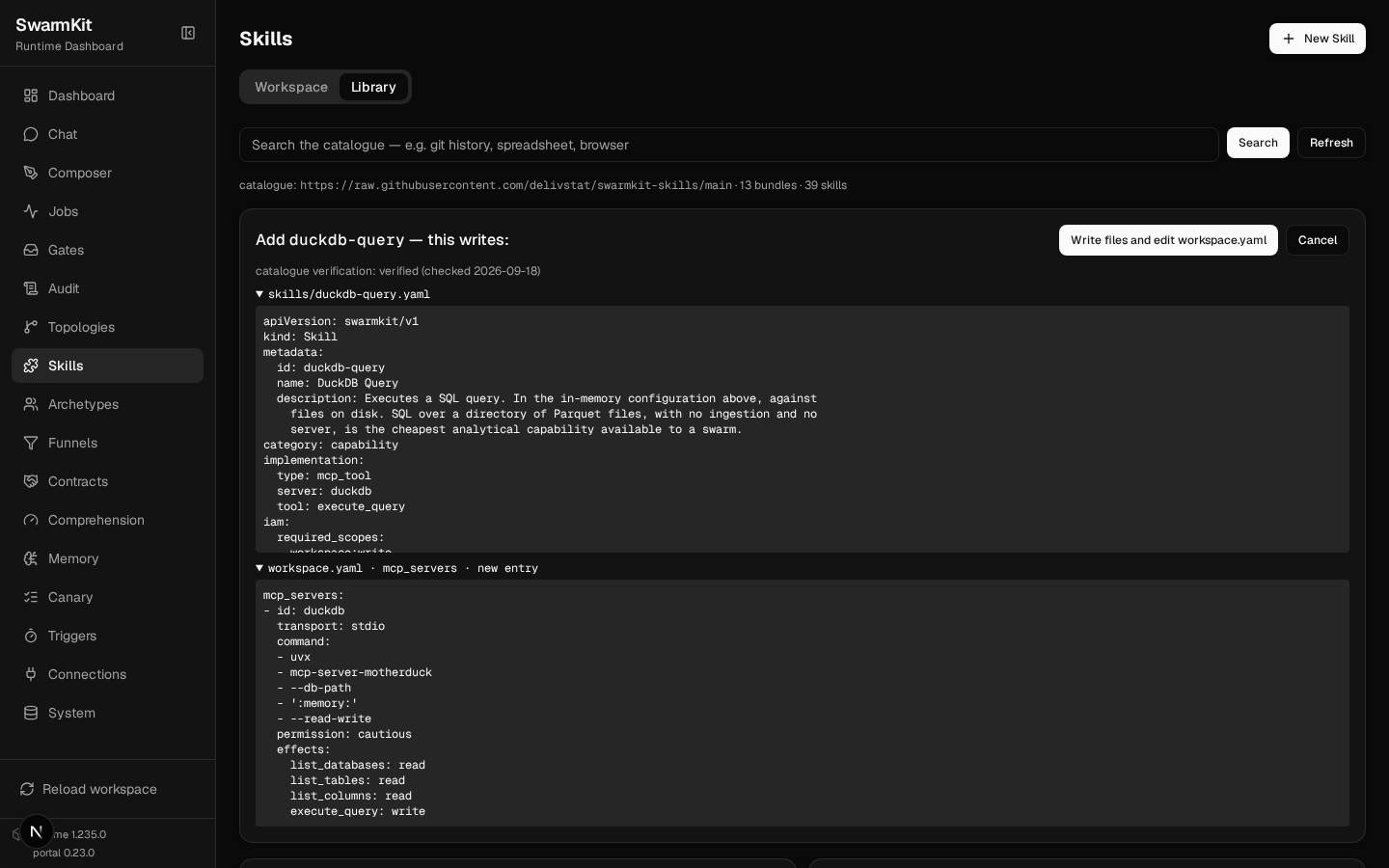
Adding a catalogue skill writes to two places — the skill file, and an mcp_servers entry in
workspace.yaml — so it shows both and asks. --dry-run prints them and writes nothing:
# catalogue verification: verified (checked 2026-09-18)
# skills/git-log.yaml (new)
apiVersion: swarmkit/v1
kind: Skill
metadata:
  id: git-log
  name: Git Log
  description: Returns commit history. History answers *why* a line looks the way
    it does. An agent without it re-litigates decisions already made.
category: capability
implementation:
  type: mcp_tool
  server: git
  tool: git_log
iam:
  required_scopes:
  - workspace:read
provenance:
  authored_by: human
  version: 1.0.0
  requires_runtime: '>=1.199.0'
  registry: swarmkit-skills

# mcp_servers entry (added to workspace.yaml)
mcp_servers:
- id: git
  transport: stdio
  command:
  - uvx
  - mcp-server-git
  - --repository
  - ${SWARMKIT_GIT_REPO}
  permission: readonly
  effects:
    git_status: read
    git_diff: read
    git_log: read
    git_show: read

dry run — nothing written.
A whole bundle is one command; the mcp_servers edit keeps your comments (it goes through the
same service the portal's Connections page uses) and a second run changes nothing:
swarmkit skill add git --yes
diff workspace.before.yaml workspace.yaml
swarmkit skill add git --yes
swarmkit validate .
wrote skills/git-status.yaml, skills/git-diff.yaml, skills/git-log.yaml and mcp_servers updated.
60a61,73
>   - id: git
>     transport: stdio
>     command:
>       - uvx
>       - mcp-server-git
>       - --repository
>       - ${SWARMKIT_GIT_REPO}
>     permission: readonly
>     effects:
>       git_status: read
>       git_diff: read
>       git_log: read
>       git_show: read
wrote no new files.
no errors, 0 warnings
swarmkit skill list says what the workspace holds and who holds it; check starts every
mcp_tool skill's server the way a run would and asks whether the tool is still there:
content-filter           decision     llm_prompt                   bound:pre_input
get-weather              capability   mcp_tool → weather           hello/assistant, translator/translator
git-diff                 capability   mcp_tool → git               held by nobody
git-log                  capability   mcp_tool → git               held by nobody
git-status               capability   mcp_tool → git               held by nobody
…
ok      git-diff                 git:git_diff
ok      git-log                  git:git_log
ok      git-status               git:git_status
ok      list-files               docs-reader:list_files
ok      read-csv                 docs-reader:read_csv
ok      read-file                filesystem:read_file
ok      search-knowledge         knowledge-search:search_knowledge
ok      write-file               filesystem:write_file
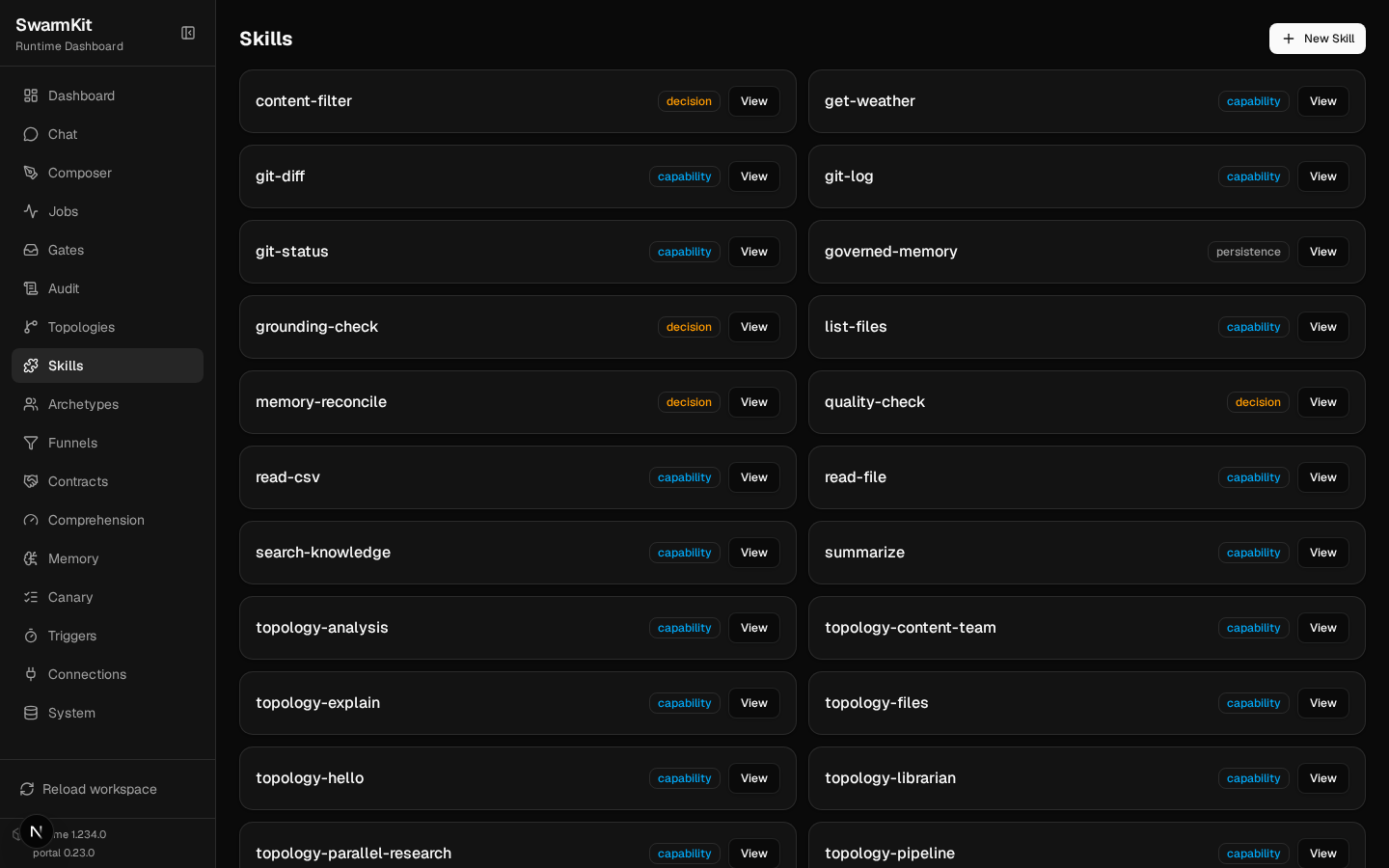
"Held by nobody" is the next step, not a problem: grant git-log to an agent
(skills_additional, Level 4) and it is in the tool list. The portal's Skills page lists the
three the moment they land:
An Agent Skills SKILL.md — the format Anthropic and others publish instructions in — imports
as an llm_prompt skill, the body as the prompt, verbatim:
And remove refuses while something holds the skill — a grant is a decision someone made:
error: 'get-weather' is held by hello/assistant, translator/translator — remove the grant first
removed skills/docx.yaml.
swarmkit skill list --available is the whole catalogue with its verification dates;
show <id> prints an entry. The same operations are GET /api/skill-catalogue,
POST /api/skills/add, POST /api/skills/import and GET /api/skills/check on swarmkit serve
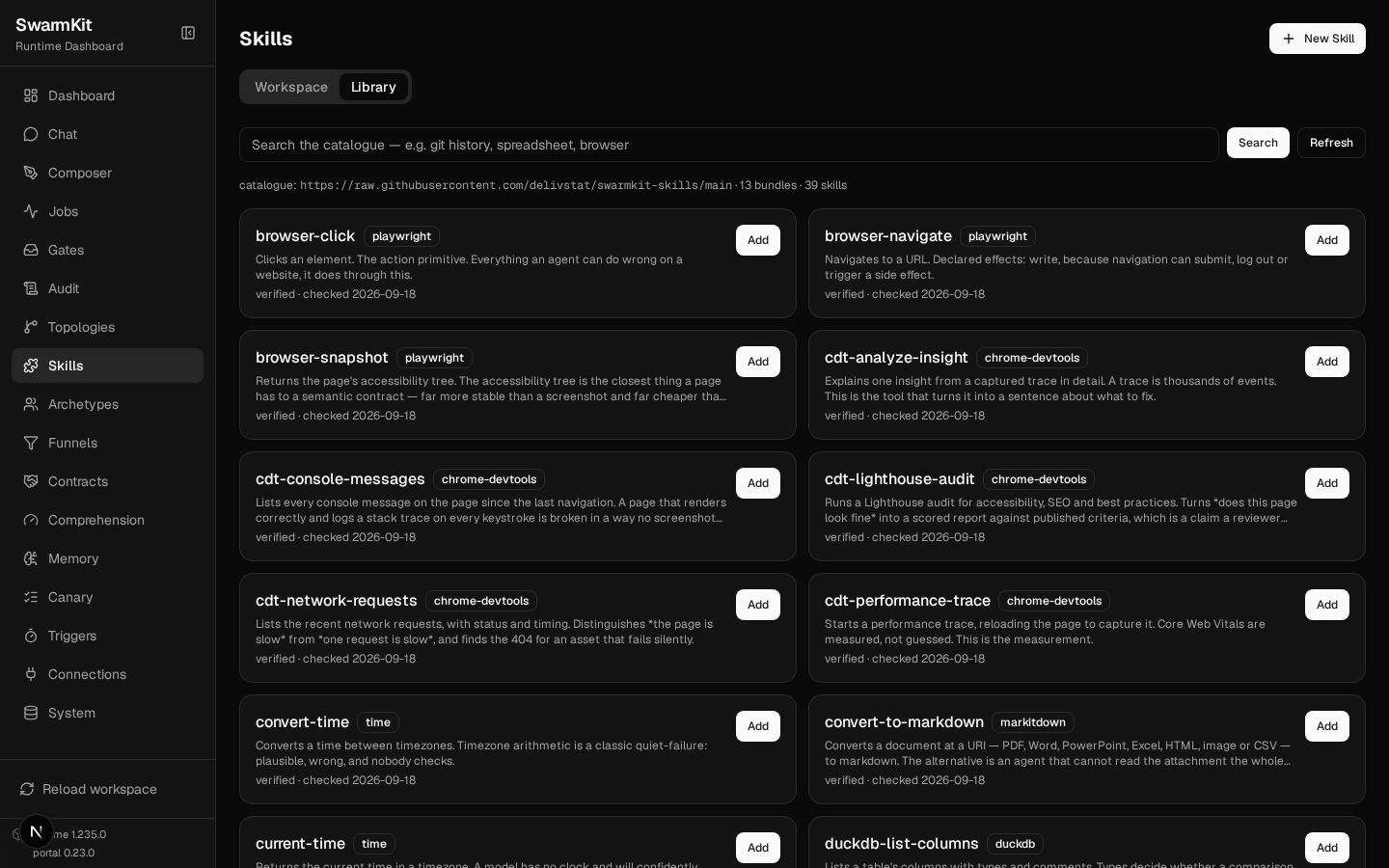
— and the portal's Skills → Library tab is that API with a search box: every catalogue entry
with its bundle and verification date, an Add that shows both fragments before it writes
anything, a paste box for a SKILL.md, and a Check button. Adding needs an admin key, the
same as reload.
The authoring swarm¶
swarmkit author … --thorough and swarmkit edit do not use one agent. They run the
skill-authoring reference topology: a conversation leader that plans, a knowledge searcher
that reads the workspace and the SwarmKit docs, a schema drafter, a validator, a test writer and
a publisher — a swarm that grows a swarm, gated by the same review as any other run.
It needs three things in the workspace, all from the runtime's reference set:
cp <swarmkit>/reference/topologies/skill-authoring.yaml topologies/
cp <swarmkit>/reference/archetypes/{authoring-supervisor,conversation-leader,knowledge-searcher,schema-drafter,artifact-validator,test-writer,artifact-publisher}.yaml archetypes/
cp <swarmkit>/reference/skills/{get-schema,list-reference-skills,query-swarmkit-docs,read-workspace-file,run-tests,validate-workspace,write-workspace-file}.yaml skills/
# workspace.yaml — the server those skills call
mcp_servers:
  - id: swarmkit-knowledge
    transport: stdio
    command: ["swarmkit", "knowledge-server"]
swarmkit knowledge-server (Level 10) serves the design notes, schemas and reference skills, and
reads and writes workspace files for the swarm. Today it runs from a SwarmKit source checkout —
it locates the corpus by walking up to the repository — so the swarm mode is for people working
with the repo; a pip install swarmkit-runtime alone gets the single-agent commands above. That
is a gap, and it is stated here rather than papered over.
With those in place:
swarmkit edit . --input "Grant the translate-text skill to the friendly-assistant archetype (add it under defaults.skills). Change nothing else."
[conversation-leader] created task plan: 3 tasks
  - explore-workspace -> knowledge-searcher
  - filesystem-explore -> knowledge-searcher
  - __auto_synthesize__ -> self (after: explore-workspace, filesystem-explore)
[knowledge-searcher] calling validate-workspace {…}
[knowledge-searcher] calling list-reference-skills {}
  task 'explore-workspace' completed (4 findings)
[conversation-leader] updated task plan: 8 total, 3 pending
[conversation-leader] executing task batch: read-archetype-file
…
It is slow. This one-line change ran for 25 minutes on kimi-k2.5 — explore, plan, read the file, draft the modification, validate it against the schema, then hand it to the publisher — and was still at the publisher when the session's time limit stopped it. The single agent did the equivalent in under a minute. Reach for the swarm when a change touches several files at once or should be checked by someone other than the agent that drafted it, and give it the time.
The gap log¶
An agent that reaches for a tool it does not have has named something the workspace lacks. When
a model calls translate-text on an agent that does not hold it, the runtime answers the call
with the tools the agent does hold (so the turn continues), writes a skill.gap audit event, and
records the gap:
  assistant                skill.gap
  translate-text           agent 'assistant' called a tool it does not hold (3x) → author a 'translate-text' skill (swarmkit author skill) and grant it to 'assistant', or tell the agent in its prompt that it has no such tool
(Asked the same thing, kimi-k2.5 answered honestly — "I don't have a translate-text tool" — and recorded nothing; the log catches models that try, which is what makes a gap real. The rows above came from a scripted call on the mock provider.)
That row is the start of the growth cycle (design §12): a gap surfaces, a person decides whether
it is a capability worth having, authors it through the conversation above, and grants it. The
runtime never grants itself a skill. swarmkit gaps --inert is the other direction: decision
skills that are bound and have never once fired (Level 7's "wired is not fired").
The review queue¶
swarmkit review list . is the inbox for decisions a run is waiting on:
| What arrives | From | You answer with |
|---|---|---|
| a multi-party approval on an artifact | a funnel's approve layer (Levels 7, 18) |
swarmkit review resolve <id> --by <you> --approve |
| a harness asking permission for a capability | a harness executor (Level 17) | swarmkit review approve <id> / reject |
| a harness asking a question | a harness executor (Level 17) | swarmkit review answer <id> "…" |
swarmkit review show <id> prints the item; the portal's Gates page is the same queue. A
decision skill's needs-revision verdict does not land here — it sends the answer back to the
agent for another attempt (Level 7). Review is for the decisions that are a person's.
Your workspace so far¶
my-swarm/
├── skills/
│   ├── translate-text.yaml      # authored
│   ├── git-log.yaml             # from the catalogue (+ git-status, git-diff; `mcp_servers: git`)
├── topologies/
│   └── translator.yaml          # authored
└── .swarmkit/
    └── store.sqlite             # the gap log lives here with everything else
Next¶
Level 14: Packaging & Distribution — publish the workspace, install one, and expose it to an AI IDE.