Level 10: Knowledge & RAG
An agent that answers from your documents, cites where each answer came from, and says so when the documents do not cover the question — with a gate that checks the citing.
What you'll learn
- A knowledge base as an MCP server: full-text first, vector search when you need it, same tool contract for both
- The built-in docs-reader server (CSV, text, images, diagrams) and MarkItDown for PDF/DOCX
- A
librarianarchetype that searches before it answers - Grounding: a
grounding-checkdecision skill on the answer, and what the runtime checks by itself - The built-in SwarmKit knowledge server, and what it is actually for
The finished workspace is examples/tutorials/10-knowledge-rag/ — Level 9 plus a knowledge/
directory, two servers and one topology. Every transcript is a real run on OpenRouter.
Build it
1. The documents
A small handbook — three markdown files and a CSV — under knowledge/docs/:
knowledge/docs/
├── expense-policy.md     # meals, travel, submitting
├── on-call.md            # rota, severities, handover, compensation
├── release-process.md    # cadence, steps, rollback
└── vendors.csv           # vendor, category, contract_end, annual_cost_inr, owner
Anything the search server can read goes here. Ingestion is the server's job, at startup.
2. A search server
One file, no external services: every markdown file is split on headings, each section goes into an in-memory SQLite FTS5 table, and one tool searches it.
# servers/search_server.py
# /// script
# dependencies = ["mcp>=1.0,<2"]
# ///
"""A knowledge-search MCP server: full-text search over knowledge/docs, no external services."""

from __future__ import annotations

import json
import os
import re
import sqlite3
from pathlib import Path

from mcp.server.fastmcp import FastMCP

server = FastMCP("knowledge-search")
_db = sqlite3.connect(":memory:")


def _sections(path: Path) -> list[tuple[str, str]]:
    """Split a markdown file on headings: [(heading, body), ...]."""
    heading, body, out = path.stem, [], []
    for line in path.read_text(encoding="utf-8").splitlines():
        if line.startswith("#"):
            if body:
                out.append((heading, "\n".join(body).strip()))
            heading, body = line.lstrip("# ").strip(), []
        else:
            body.append(line)
    if body:
        out.append((heading, "\n".join(body).strip()))
    return [(h, b) for h, b in out if b]


def _index() -> int:
    root = Path(os.environ.get("KNOWLEDGE_DIR", "knowledge/docs"))
    _db.execute("CREATE VIRTUAL TABLE docs USING fts5(source, heading, body)")
    n = 0
    for path in sorted(root.rglob("*")):
        if path.suffix in (".md", ".txt"):
            for heading, body in _sections(path):
                _db.execute("INSERT INTO docs VALUES (?, ?, ?)", (str(path), heading, body))
                n += 1
    _db.commit()
    return n


@server.tool()
def search_knowledge(query: str, limit: int = 3) -> str:
    """Search the knowledge base. Returns the best-matching sections as JSON: source file,
    heading, text. Cite the source when you use one."""
    terms = " OR ".join(re.findall(r"[A-Za-z0-9]+", query))
    rows = _db.execute(
        "SELECT source, heading, body FROM docs WHERE docs MATCH ? ORDER BY rank LIMIT ?",
        (terms, limit),
    ).fetchall()
    return json.dumps(
        [{"source": s, "heading": h, "text": b} for s, h, b in rows], indent=2, ensure_ascii=False
    )


if __name__ == "__main__":
    print(f"indexed {_index()} sections", file=__import__("sys").stderr)
    server.run()
The tool's docstring is what the model reads as the tool description — "cite the source when you use one" is an instruction to the agent, placed where the agent looks for it.
3. Declare the servers
# workspace.yaml — two more servers
mcp_servers:
  # Full-text search over knowledge/docs — one file, no external service. `open`: local, read-only.
  - id: knowledge-search
    transport: stdio
    command: ["uv", "run", "servers/search_server.py"]
    env:
      KNOWLEDGE_DIR: knowledge/docs
    permission: open

  # Built into the runtime: CSV, draw.io, SVG, images and plain files, with directory listing.
  - id: docs-reader
    transport: stdio
    command: ["swarmkit", "docs-reader", "--workspace", "."]
    permission: readonly
    effects:
      read_csv: read
      read_text: read
      list_files: read
swarmkit docs-reader exposes read_csv, read_text, list_files, view_image (returns the
image to a multimodal model), read_drawio and read_svg. It does not parse PDF or Word —
that is MarkItDown's job, and the two are meant to sit side by side:
  - id: markitdown
    transport: stdio
    command: ["uvx", "markitdown-mcp"]     # one tool: convert_to_markdown(uri) — PDF, DOCX, XLSX, PPTX
4. Skills and a librarian
Three skills over the servers (search-knowledge → search_knowledge, read-csv → read_csv,
list-files → list_files), and an archetype that is told how to behave:
# archetypes/librarian.yaml
apiVersion: swarmkit/v1
kind: Archetype
metadata:
  id: librarian
  name: Librarian
  description: Answers questions from the company handbook and cites where the answer came from.
role: root
defaults:
  model:
    provider: openrouter
    name: moonshotai/kimi-k2.5
    temperature: 0.2
    max_tokens: 2048
  prompt:
    system: |
      You answer questions about company policy from the handbook. Always search first
      (search-knowledge); answer only from what the search returns and name the source file
      for each fact. If the handbook does not cover the question, say so — do not guess.
      For questions about vendors or contracts, read knowledge/docs/vendors.csv with read-csv.
  skills:
    - search-knowledge
    - read-csv
    - list-files
provenance:
  authored_by: human
  version: 1.0.0
5. A gate on the citing
The prompt asks for sources. A decision skill bound post_output checks for them, and a
fail sends the answer back for revision (Level 7):
# skills/grounding-check.yaml
apiVersion: swarmkit/v1
kind: Skill
metadata:
  id: grounding-check
  name: Grounding Check
  description: >
    Fails an answer that states handbook facts without citing a source, or that cites a source
    the answer's facts do not appear in.
category: decision
implementation:
  type: llm_prompt
  prompt: |
    You check whether an answer is grounded. The user message is the agent's final answer,
    which may quote search results it retrieved.
    - pass: every factual claim about company policy is attributed to a source file, or the
      answer says it could not find the information.
    - fail: it states policy facts (amounts, limits, deadlines, names) with no source, or
      contradicts the sources it quotes.
    Reply with JSON only: {"verdict": "pass" | "fail", "reasoning": "<one sentence>"}
outputs:
  type: object
  required: [verdict, reasoning]
  properties:
    verdict:
      type: string
      enum: [pass, fail]
    reasoning:
      type: string
provenance:
  authored_by: human
  version: 1.0.0
# topologies/librarian.yaml
apiVersion: swarmkit/v1
kind: Topology
metadata:
  name: librarian
  version: 0.1.0
  description: One agent that searches the handbook and cites its sources.
governance:
  decision_skills:
    - id: grounding-check
      trigger: post_output    # judged after every answer; a fail makes the agent revise
      scope: "*"
agents:
  root:
    id: librarian
    role: root
    archetype: librarian
A topology-level governance.decision_skills adds to the workspace's bindings — this topology
runs under the content filter, quality check and memory from earlier levels and the grounding
gate. Both files are editable in the portal's Composer (the topology) and Skills page (the
skill, as a form or as YAML).
6. Run it
SWARMKIT_VERBOSE=1 swarmkit run . librarian --input "What's the daily meal limit when travelling, and can I claim a beer with dinner?" --verbose
indexed 11 sections
--- [librarian] calling moonshotai/kimi-k2.5 ---
  tools: ['search-knowledge', 'read-csv', 'list-files']
  tool_calls: ['search-knowledge']
  [librarian] calling search-knowledge {"query": "daily meal limit travelling travel alcohol beer dinner expense claim"}
  executing: search-knowledge
  [librarian] got results: search-knowledge (837B) | waiting for model... (turn 1)
[librarian] done (21.7s)
**Daily meal limit while travelling:** Up to **₹2,500 per day** (or the local equivalent).
*Source: knowledge/docs/expense-policy.md — "Meals"*

**Can you claim a beer with dinner?** **No** — alcohol is not reimbursable.
*Source: knowledge/docs/expense-policy.md — "Meals"*
swarmkit logs . --last 1 shows the gates around it — content-filter before, then the tool
call, then grounding-check and quality-check on the answer, then the memory writer:
  librarian                started  (root)
  librarian                decision.evaluated
  librarian                skill    search-knowledge
  librarian                decision.evaluated
  librarian                decision.evaluated
  librarian                done     53741ms
A question the CSV answers — the agent picks the right tool from the prompt:
  [librarian] calling read-csv {"path": "knowledge/docs/vendors.csv"}
[librarian] done (15.0s)
Based on the vendor data in **knowledge/docs/vendors.csv**, the contract that expires first is:

- **Vendor:** PagerPost
- **Expiration Date:** 2026-11-30
- **Owner:** platform
…
And one the handbook does not cover. This is the run that matters — an ungrounded assistant answers it anyway:
  [librarian] calling search-knowledge {"query": "parental leave policy"}
  [librarian] calling list-files {"directory": "knowledge/docs"}
  [librarian] calling search-knowledge {"query": "leave policy maternity paternity"}
  [librarian] calling search-knowledge {"query": "HR policy benefits employee handbook"}
[librarian] done (35.1s)
The handbook does not contain a parental leave policy. The available documents cover:

- **expense-policy.md** — Travel expenses, meal reimbursements, receipt requirements
- **on-call.md** — On-call rotation and incident response procedures
- **release-process.md** — Software release procedures
- **vendors.csv** — Vendor contact information

You may need to check with HR or your manager for parental leave benefits, as this is not
documented in the company handbook I have access to.
It searched three ways, listed the directory to be sure, and said no. The gate passed it: "says it could not find the information" is a grounded answer.
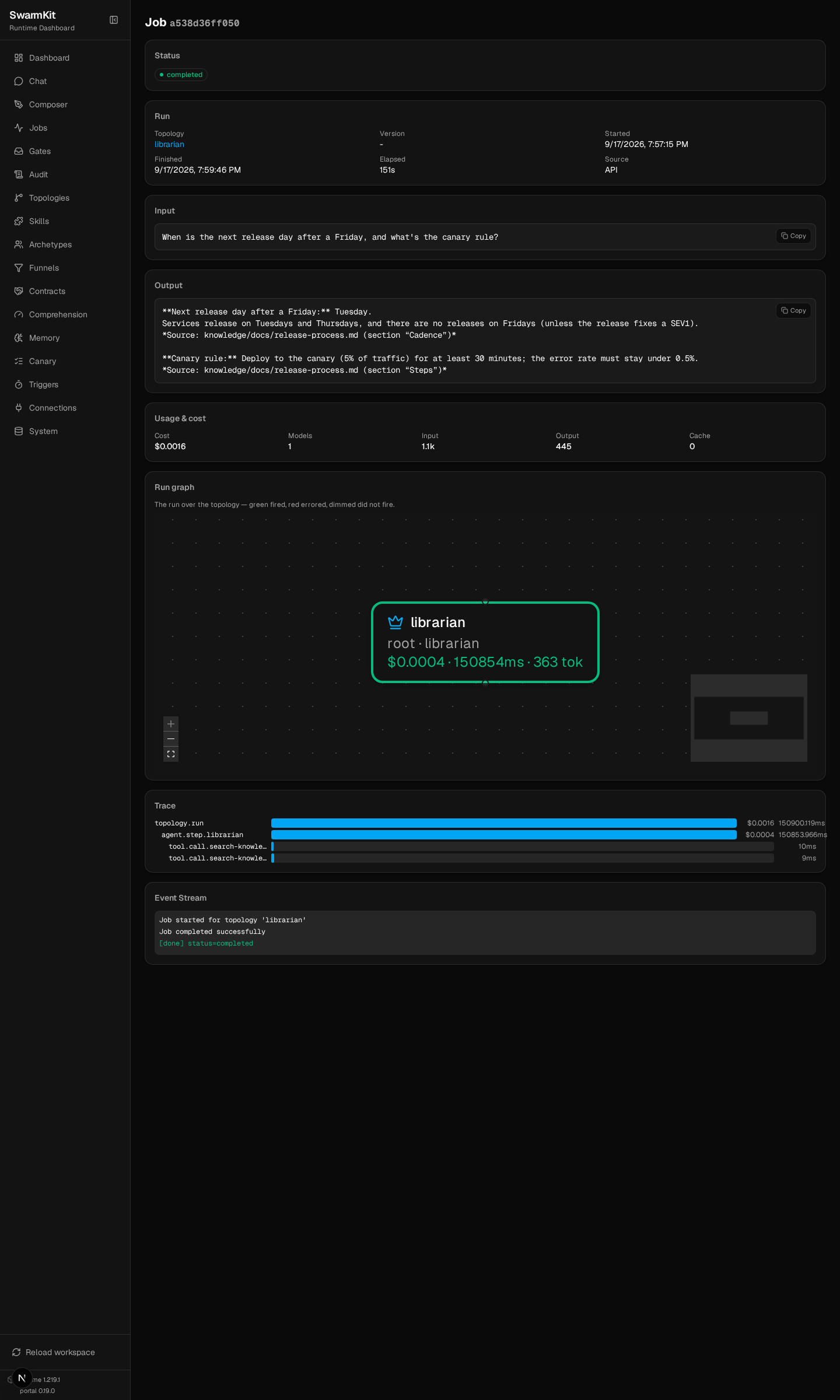
In the portal the run's job page shows the two tool.call.search-knowledge spans under the agent
step, with the query and the result as attributes:
7. Vector search, same contract
Full-text search finds sections that share words with the question. "Who do I page if nobody
answers?" shares none with the on-call rota's "the secondary is paged only when the primary does
not acknowledge". A vector index finds it by meaning. servers/vector_search_server.py in the
finished workspace is the same server over an embedded ChromaDB collection — same
search_knowledge(query, limit) tool, same JSON back — so switching is one line in
workspace.yaml:
  - id: knowledge-search
    transport: stdio
    command: ["uv", "run", "servers/vector_search_server.py"]   # dependencies: mcp, chromadb
    env:
      KNOWLEDGE_DIR: knowledge/docs
      CHROMADB_PATH: knowledge/chromadb
    permission: open
search_knowledge("who do I page if nobody answers", 1)
[{"source": "knowledge/docs/on-call.md", "heading": "Rota",
  "text": "The platform team runs a weekly rota … the secondary is paged only when the primary
           does not acknowledge within 15 minutes."}]
The first start downloads ChromaDB's default embedding model (all-MiniLM-L6-v2, ~80 MB) and takes a few minutes to install; after that it is local and offline. Nothing in the topology, archetype or skill changed — the index is the server's business.
8. What the runtime grounds by itself
The grounding-check skill judges prose. For structured output the runtime does it without a
model: a worker with the default findings schema (Level 6) returns {"findings": [{"fact",
"source"}]}, the runtime fills empty source fields from the tool calls that produced the turn,
and a finding with no source is recorded as a grounding.checked audit event with the unsourced
claims listed. A for loop, not a judge — deterministic, free, and on every worker turn.
9. The built-in knowledge server is something else
swarmkit knowledge-server is also an MCP server, but its corpus is SwarmKit itself — the
design notes, schemas and reference skills — for an AI assistant that is helping you write
workspaces: search_docs, get_schema, list_schemas, get_design_note,
list_reference_skills, validate_workspace, get_error_reference, read_workspace_file. It is
the authoring assistant's knowledge base, not yours; it runs inside a SwarmKit checkout and is
covered with the other AI-IDE integrations in Level 14.
Your workspace so far
my-swarm/
├── workspace.yaml               # + knowledge-search, docs-reader
├── knowledge/
│   └── docs/                    # the handbook
├── servers/
│   ├── search_server.py         # FTS5
│   └── vector_search_server.py  # ChromaDB, same tool
├── archetypes/
│   └── librarian.yaml
├── skills/
│   ├── search-knowledge.yaml · read-csv.yaml · list-files.yaml
│   └── grounding-check.yaml
└── topologies/
    └── librarian.yaml           # grounding-check bound post_output
Next
Level 11: Serve & HTTP API — run the workspace as a service and call it from anywhere.