Level 22: Running a fleet¶
Many swarmkit serve instances under one self-hosted control plane: enrolment in both
directions, the observed inventory, a registry that deploys without rewriting your files, a
funnel gate resolved from one inbox, and the gaps a fleet mines from what its agents reached for.
What you'll learn¶
- What the control plane is (and is not): a separate app over the serve contract, never a dependency of it
- Two ways an instance joins: Mode A (the panel reaches the instance) and Mode B (
swarmkit connect, outbound-only) - The fleet seam on every instance:
/capabilities,/fleet/state, enrolment tokens, membership keys - Adopt → deploy → drift, and why a deploy leaves your comments alone
- A multi-party gate resolved from the panel — and what the panel cannot do for you
- Gap mining:
skill.gapon an instance becomes a ranked row on the fleet - OpenTelemetry: traces to Jaeger, metrics to Prometheus, the Grafana dashboard
The workspace is examples/tutorials/22-fleet/ — Level 16 plus one topology, gap-probe.
Everything below ran against runtime 1.230.0, control-plane 0.48.0 and fleet UI 0.12.0; the
transcripts are what they printed.
The idea¶
One instance is the OSS on-ramp: swarmkit serve with its portal. Operating many — a Minder box
in every house, a serve per team — needs a place that sees them all, and that place must not become
a control plane you hand to a vendor. So it is a second self-hostable package,
swarmkit-control-plane, an independent application and a client of the serve API: it depends on
the contract, never on the runtime's code (Fleet control plane).
Each instance keeps its own authority. The panel can ask an instance to deploy a registry version or resolve a gate; every such mutation is a request the instance authorises and audits with the acting principal, on both sides.
Build it¶
1. Bring up the panel¶
pip install swarmkit-control-plane
export SWARMKIT_CONTROL_PLANE_SECRET_KEY=$(python -c "from cryptography.fernet import Fernet; print(Fernet.generate_key().decode())")
swarmkit-control-plane --data-dir ~/.swarmkit/fleet --port 8843 --cors-origin http://127.0.0.1:3000
The fleet UI is a separate static app; deploy/control-plane/docker-compose.yml hosts panel and UI
together behind one origin (docker compose -f deploy/control-plane/docker-compose.yml up -d --build,
then http://localhost:8080). This walkthrough ran the UI from the repository
(pnpm dev in packages/control-plane-ui, NEXT_PUBLIC_CONTROL_PLANE_API=http://127.0.0.1:8843).
Without --operator-token the panel runs open — fine on a laptop, not on a network. Before
exposing it: --operator-token=<secret> (repeatable) and/or --oidc-issuer + --oidc-audience for
human logins. The secret key must be fixed: the fleet identity and every membership credential
are encrypted with it, and an ephemeral key means the panel cannot read its own registry after a
restart.
2. Enrol an instance (Mode A)¶
The panel can reach this instance, so it is enrolled with an endpoint and the key it will act
with. Choose that key deliberately: the panel resolves gates as this identity (§5 below), so it
is Alice's — a member of engineering-lead in roles/leads.yaml (Level 16).
curl -s -X POST localhost:8843/instances -H content-type:application/json -d '{"name":"handbook","endpoint":"http://127.0.0.1:8125","token_ref":"env:ALICE_TOKEN","tier":"run"}'
{
 "id": "58024d76ed7b", "name": "handbook", "connection": "direct", "tier": "run", "schema_version": "1.44.0",
 "capabilities": {
  "serve_version": "1.230.0", "workspace_id": "my-swarm",
  "topologies": ["analysis", "content-team", "doc-review", "explain", "files", "gap-probe", "hello", "librarian", "parallel-research", "pipeline", "review-team", "structured-review", "translator"],
  "features": {"auth": "api_key", "compression": "off", "canary": true, "a2a": false}
 }
}
Enrolment already read /capabilities. A run-tier key can read state, start runs and resolve
gates; it cannot deploy. Deploying is a fleet membership, human-issued on the instance:
# Enrollment token (scope: manage, valid 900s, single-use):
<the token>

# Hand this to the fleet operator. In the fleet UI, open this instance and use
# 'Register' (Fleet enrollment) — paste the token there. Works once, then expires.
# NOTE: 'manage' lets the fleet deploy artifacts to this instance.
{"membership_id": "dd9862e14802", "scope": "manage", "fingerprint": "d303439b98af",
 "counts": {"topologies": 13, "skills": 11, "archetypes": 7, "triggers": 3, "funnels": 1, "contracts": 2, "roles": 1}}
The panel presented its signed identity, the instance pinned it and issued a membership key (stored encrypted on the panel, never shown), and the first sync happened. On the instance:
FLEET_ID                                                        SCOPE     FINGERPRINT     IDENTITY
fleet:sxouvlbrsr4vzdfq5t2l7flbcoa5sptyj4sjtbh3iibafkww5b2a      manage    df788eecfcc6    pinned
fleet:wh4pbhdi2lilkcmyravqvns7xlsexkogsknjzkfiv5jhktqdgncq      manage    d303439b98af    pinned
Two rows: a panel from an earlier session, and this one. Memberships persist on the instance until
ejected (DELETE /fleet/membership/{id}) — the instance, not the panel, holds that list.

3. The inventory¶
A sync pulls /fleet/state: every artifact with its content, its content hash, and the file as
written. After the first pull it is a delta — the names-and-hashes manifest, then only the
bodies that changed:
{"counts": {"topologies": 13, "skills": 11, "archetypes": 7, "triggers": 3, "funnels": 1, "contracts": 2, "roles": 1},
 "delta": {"mode": "delta", "fetched": 0, "reused": 38, "removed": 0},
 "pulled_usage": 0, "pulled_gaps": 0, "pulled_audit": 0}
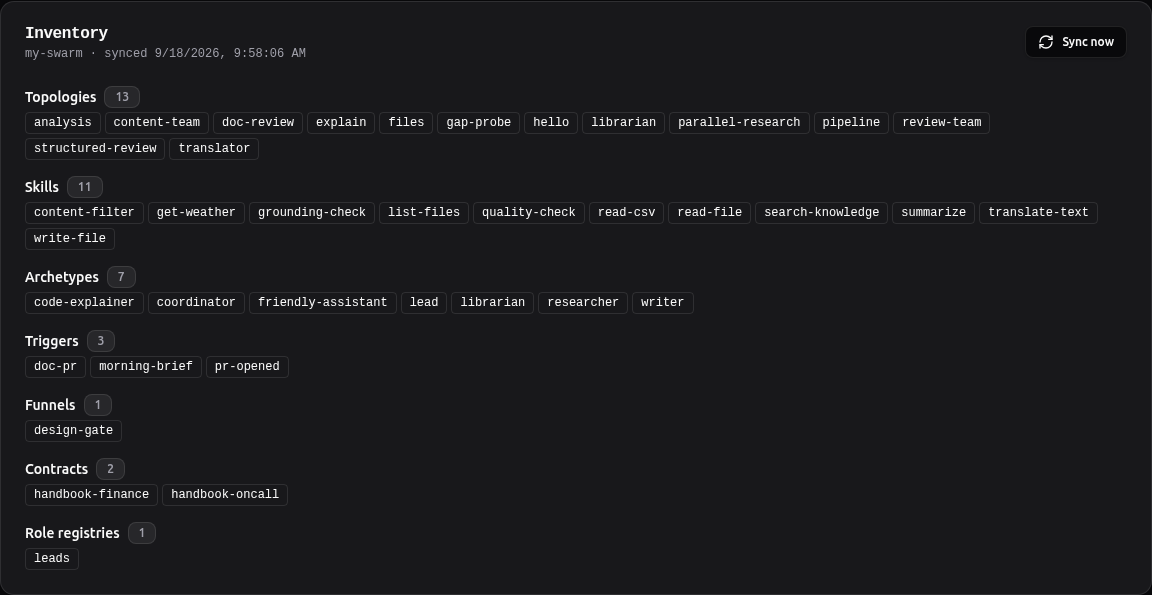
Funnels, contracts and role registries are inventory too (runtime 1.230.0). The three pulled_*
counts are §6.
4. Adopt, deploy, drift¶
An observed artifact becomes a registry version by adopting it — content-addressed, with its provenance recording which instance it came from:
curl -s -X POST localhost:8843/instances/58024d76ed7b/adopt -d '{"kind":"funnel","artifact_id":"design-gate"}'
{"kind": "funnel", "artifact_id": "design-gate", "version": "v1", "content_hash": "de614a73ec0d…", "adopted_from": "58024d76ed7b"}
A deploy pushes a version to an instance over the membership credential, signed with the panel's identity (the instance verifies the signature against the pinned key before writing anything):
curl -s -X POST localhost:8843/instances/58024d76ed7b/deploy -d '{"kind":"funnel","artifact_id":"design-gate","version":"v1"}'
diff design-gate.before.yaml funnels/design-gate.yaml && echo byte-identical
curl -s localhost:8843/instances/58024d76ed7b/drift
{"status": "ok", "version": "v1", "mode": "direct"}
byte-identical
[{"kind":"funnel","id":"design-gate","intended_version":"v1","actual_version":"1.0.0","status":"ok"}]
byte-identical is the point: the registry kept the file as adopted — comments, key order — and
the instance wrote that text once it parsed to the signed content. Drift compares content
hashes, which is why the registry's v1 and the file's own 1.0.0 agree; edit the file on the
instance and the next sync flips it to drift.
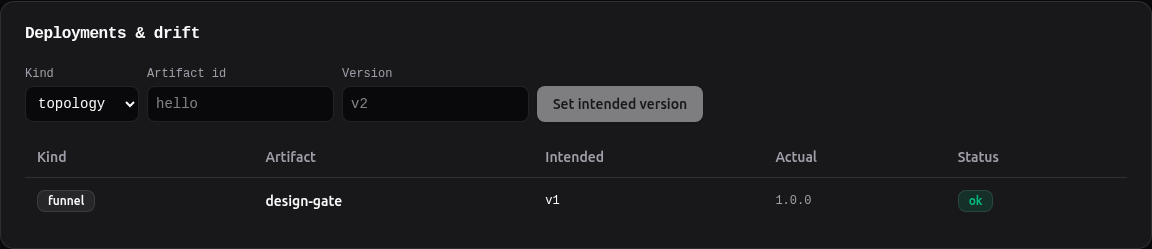
Role registries are inventory and adoptable but not deployable: iam:modify is a scope
reserved for humans (design §8.7), and a fleet push is not that approval.
5. A gate, from the panel¶
Level 16's analysis topology parks on the design-gate funnel until two leads approve. Start it:
curl -s -X POST -H "Authorization: Bearer $APP_TOKEN" localhost:8125/run/analysis -d '{"input":"Should we raise the travel meal allowance from 2,500 to 3,500 rupees per day?","correlation_id":"HB-91"}'
curl -s -H "Authorization: Bearer $APP_TOKEN" localhost:8125/jobs/141a7cb613e4
{"job_id": "141a7cb613e4", "status": "deferred", "error": "awaiting review: gate '141a7cb613e4:analyst' awaits approval — role-tasks opened on the review queue"}
The instance's gate card shows both role-tasks. The panel resolves as Alice — the key it was
enrolled with. Approving the product-lead task is refused by the instance, and the card says why;
approving the engineering-lead task is counted:
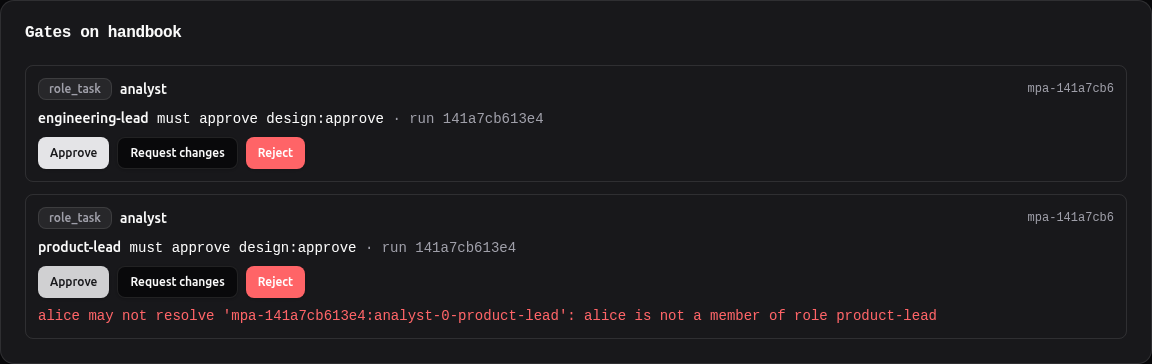
{"status": "pending", "outstanding": ["product-lead (design:approve)"], "distinct_approvers": ["alice"]}
That is what a panel acting as one identity can do: cast Alice's approval and nothing else. Bob resolves his own role-task with his own key (Level 16), and the run resumes:
curl -s -X POST -H "Authorization: Bearer $BOB_TOKEN" localhost:8125/review/mpa-141a7cb613e4:analyst-0-product-lead/resolve -d '{"outcome":"approve","comment":"numbers check out"}'
curl -s -H "Authorization: Bearer $APP_TOKEN" localhost:8125/gates/141a7cb613e4:analyst
curl -s -H "Authorization: Bearer $APP_TOKEN" localhost:8125/jobs/141a7cb613e4
{"gate_id": "141a7cb613e4:analyst", "status": "approved", "resolved": true, "distinct_approvers": ["alice", "bob"], "outstanding": []}
{"job_id": "141a7cb613e4", "status": "completed", "correlation_id": "HB-91", "output": "{\n  \"findings\": [\n    \"Hotel prices in Mumbai and Bengaluru have increased significantly…"}
Harness gates (Level 17's permission and input requests) resolve from the same card, with approve / reject / an answer.
5b. Approve as yourself¶
The enrolment key is the panel's identity, not a person's. When operators sign into the panel with
OIDC, the panel knows who clicked — and an instance can be told to believe it. That is a separate,
human-issued membership scope, approve-as: the panel signs an assertion of the operator's subject
with its fleet identity (the key the instance pinned at register), the instance verifies it, and
the role registry still decides whether that subject is a member of the role. The card says up
front who a click will count as.
This run used a local OpenID provider (packages/control-plane/demos/local_idp.py) so the whole
flow — the fleet UI's real sign-in, the panel's JWT verification, the assertion — runs on a laptop:
IDP_USER=alice IDP_ISSUER=http://127.0.0.1:8556 uv run uvicorn local_idp:app --app-dir packages/control-plane/demos --port 8556
swarmkit-control-plane --data-dir ~/.swarmkit/fleet --port 8843 --cors-origin http://127.0.0.1:3000 \
  --oidc-issuer http://127.0.0.1:8556 --oidc-audience swarmkit-fleet
# the fleet UI: NEXT_PUBLIC_OIDC_AUTHORITY=http://127.0.0.1:8556 NEXT_PUBLIC_OIDC_CLIENT_ID=swarmkit-fleet-ui NEXT_PUBLIC_OIDC_AUDIENCE=swarmkit-fleet
Enrol the instance with the application's key this time — deliberately not a person's:
curl -s -H "Authorization: Bearer $ALICE_JWT" -X POST localhost:8843/instances -d '{"name":"handbook","endpoint":"http://127.0.0.1:8125","token_ref":"env:APP_TOKEN","tier":"run"}'
curl -s -H "Authorization: Bearer $ALICE_JWT" localhost:8843/instances/fb81aa82cad0/review | jq .resolves_as
# Enrollment token (scope: approve-as, valid 900s, single-use):
<the token>
# NOTE: 'approve-as' lets the fleet deploy AND resolve multi-party approvals as the
# signed-in operator it asserts (their OIDC subject must be a role member).
curl -s -H "Authorization: Bearer $ALICE_JWT" -X POST localhost:8843/instances/fb81aa82cad0/register -d '{"enroll_token":"<the token>"}'
curl -s -H "Authorization: Bearer $ALICE_JWT" localhost:8843/instances/fb81aa82cad0/review | jq .resolves_as
{"membership_id": "151264116841", "scope": "approve-as", "fingerprint": "0702cd84ac3c"}
{"kind": "subject", "subject": "alice"}
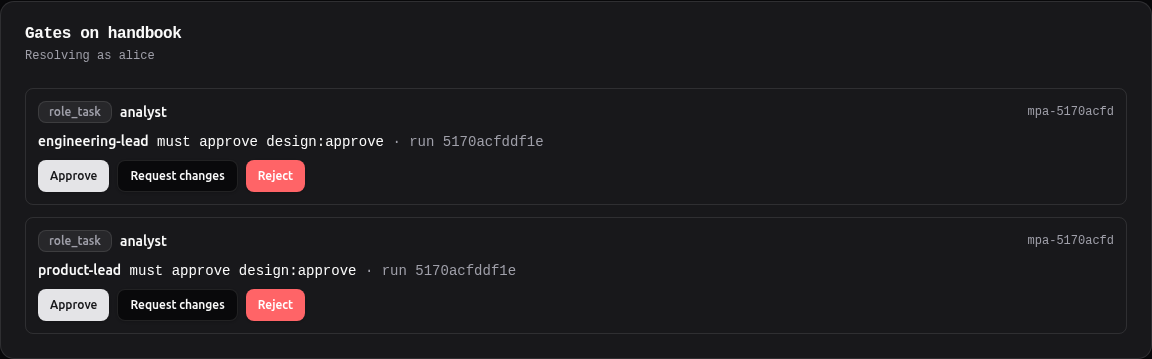
Now the fleet UI. Alice signs in, the card says Resolving as alice, she approves the engineering-lead task; then Bob signs in and approves the other:

curl -s -H "Authorization: Bearer $APP_TOKEN" localhost:8125/gates/5170acfddf1e:analyst
curl -s -H "Authorization: Bearer $APP_TOKEN" localhost:8125/jobs/5170acfddf1e
curl -s -H "Authorization: Bearer $APP_TOKEN" localhost:8125/review/all | jq '.[] | select(.run_id=="5170acfddf1e") | {role, status, resolved_by}'
{"gate_id": "5170acfddf1e:analyst", "status": "approved", "resolved": true, "distinct_approvers": ["alice", "bob"], "outstanding": []}
{"job_id": "5170acfddf1e", "status": "completed", "correlation_id": "HB-92"}
{"role": "engineering-lead", "status": "approved", "resolved_by": "alice"}
{"role": "product-lead",     "status": "approved", "resolved_by": "bob"}
Two people, two clicks in one panel, one enrolment key that belongs to neither of them — and the
instance counted the people. The instance's audit records both the person and the fleet that
relayed the click (via_fleet). Without OIDC on the panel, or without approve-as on the
instance, the card reads "Resolving as the enrolment key" with the reason, and nothing is asserted
(design 28).
6. Gaps, mined¶
gap-probe is an assistant whose prompt insists on a translate-text tool the workspace never
granted it. The model called it anyway; the runtime answered with the tools the agent does hold,
wrote a skill.gap audit event and recorded the gap (Level 13):
curl -s -X POST -H "Authorization: Bearer $APP_TOKEN" localhost:8125/run/gap-probe -d '{"input":"Translate into French: the invoice is due on Friday."}'
{"detail":"Max concurrent jobs reached. Try again later."}     # 429 — max_concurrent: 2, and two runs were up
# …a minute later
{"job_id": "b0e605788715", "status": "pending", "topology": "gap-probe"}
translate-text agent 'assistant' called a tool it does not hold (1x) → author a 'translate-text' skill (swarmkit author skill) and grant it to 'assistant', or tell the agent in its prompt that it has no such tool
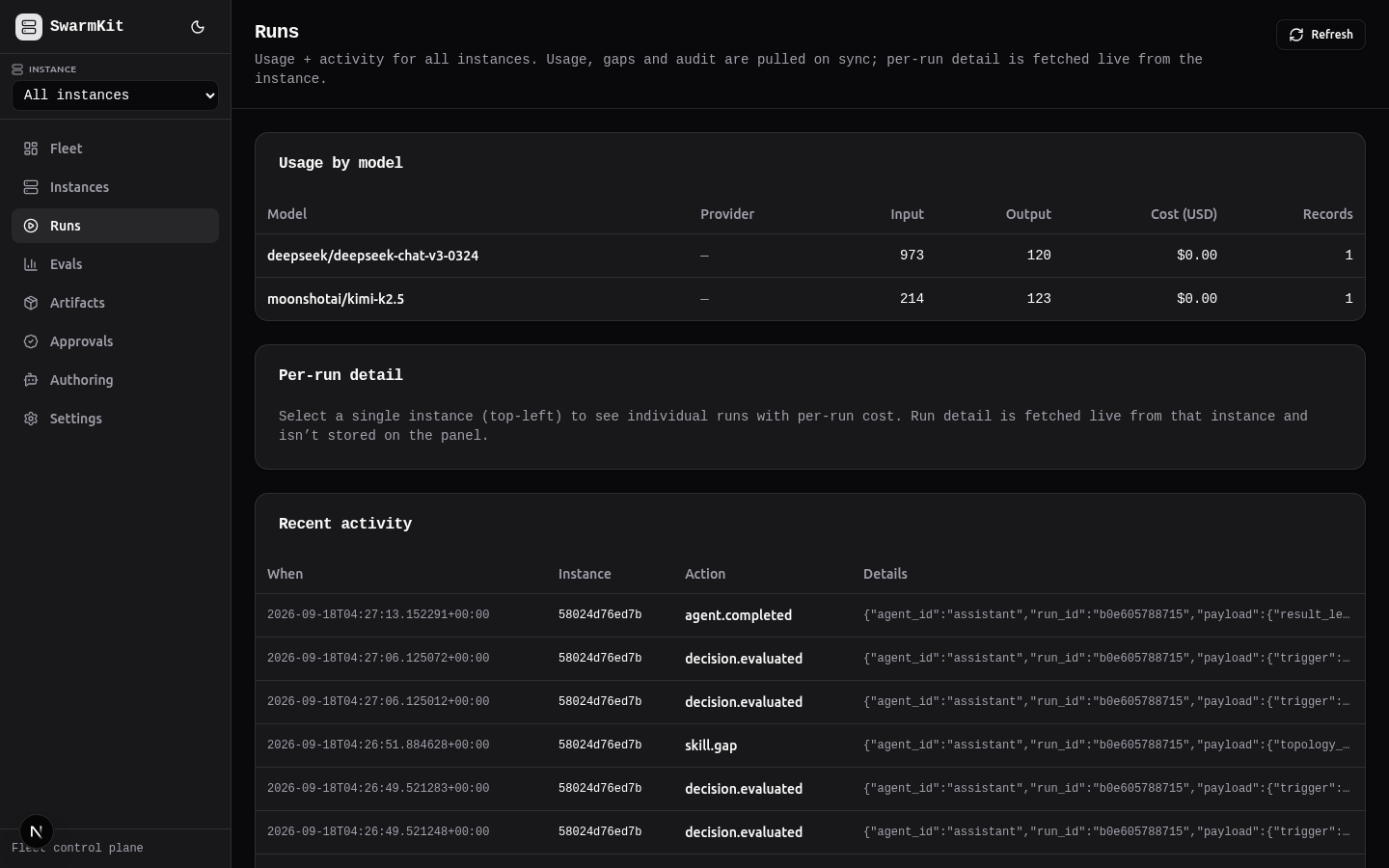
The next sync pulls the gap log and the audit tail — after a per-instance cursor, so each event travels once — alongside usage:
curl -s -X POST localhost:8843/instances/58024d76ed7b/sync
curl -s localhost:8843/gaps
curl -s "localhost:8843/audit?limit=6"
{"delta": {"mode": "delta", "fetched": 0, "reused": 38, "removed": 0}, "pulled_usage": 2, "pulled_gaps": 1, "pulled_audit": 33}
[{"capability":"translate-text","occurrences":1,"instances":1,"last_seen":"2026-09-18T04:26:51+00:00","description":"author a 'translate-text' skill (swarmkit author skill) and grant it to 'assistant', …"}]
{"ts": "2026-09-18T04:27:13", "instance_id": "58024d76ed7b", "action": "agent.completed",    "run_id": "b0e605788715"}
{"ts": "2026-09-18T04:27:06", "instance_id": "58024d76ed7b", "action": "decision.evaluated", "run_id": "b0e605788715"}
{"ts": "2026-09-18T04:26:51", "instance_id": "58024d76ed7b", "action": "skill.gap",          "run_id": "b0e605788715"}
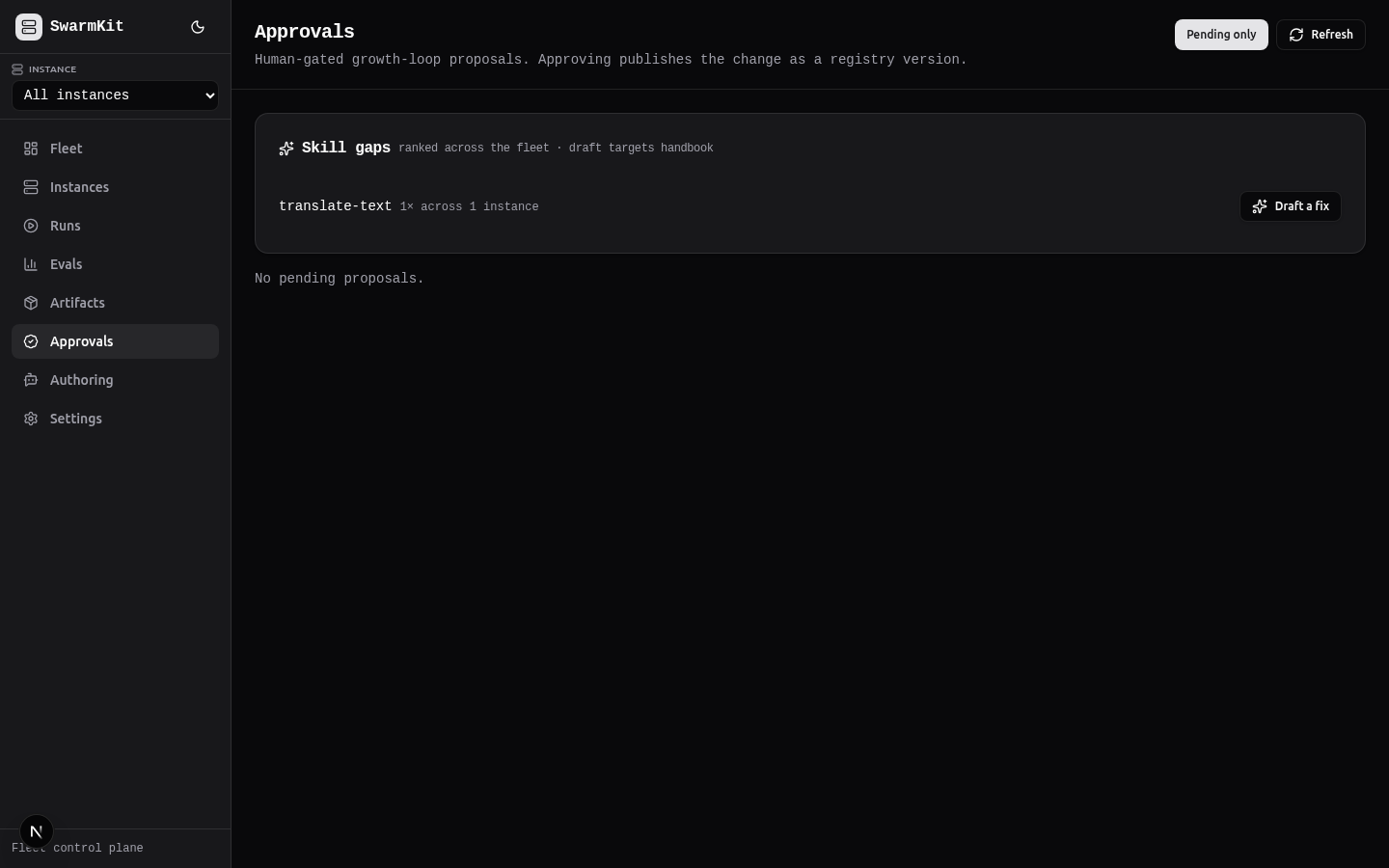
On the fleet, a gap is ranked by how often it recurs and across how many instances; Draft a fix starts the growth loop (design §12) — the authoring swarm on an instance drafts the skill, an eval tests it, a human approves it into the registry, and a deploy distributes it:
7. Enrol an instance that cannot be reached (Mode B)¶
A Minder box behind NAT joins outbound-only. The operator mints a join code on the panel; the instance's connector uses it once, pulls its own state from local serve, and posts it:
swarmkit connect http://127.0.0.1:8843 --join-code <code> --name house-3 \
  --serve-url http://127.0.0.1:8125 --serve-token env:OPS_TOKEN --tier run --once
connector: joining fleet at http://127.0.0.1:8843 via join code
connector: joined fleet as instance 7b21754a0d77 (tier=run)
--serve-token is the local serve's key; every tutorial workspace has API-key auth on, so without
it the connector's own /fleet/state read is a 401. The join code is single-use; the credential
it issues is saved (~/.swarmkit/connect/<pair>.json, owner-readable only), so the long-running
connector is the same command with no join code:
swarmkit connect http://127.0.0.1:8843 --serve-url http://127.0.0.1:8125 --serve-token env:OPS_TOKEN --interval 2
connector: resuming as instance 7b21754a0d77 from /home/you/.swarmkit/connect/c71129859c7ccdf3.json
connector: polling http://127.0.0.1:8843 as instance 7b21754a0d77 (tier=run)
(--instance-id + --panel-token still work for a credential minted on the instance's page;
--state moves the file.)
From then on the panel drives it through a command queue — the connector polls, executes each command against local serve over loopback, and reports the result:
curl -s -X POST localhost:8843/instances/7b21754a0d77/commands -d '{"verb":"run","args":{"topology_name":"hello","body":{"input":"Say hello in five words."}}}'
curl -s localhost:8843/instances/7b21754a0d77/commands
(A run without topology_name and body is refused at enqueue with a 400 naming them — the
panel checks the connector's route template before queueing, so a malformed command does not come
back a poll later as "serve returned 422".)
{"cmd_id": "00547ab722a8", "verb": "run", "status": "queued"}
{"cmd_id": "00547ab722a8", "verb": "run", "status": "done", "output": {"job_id": "edbd9a5e6c18", "status": "pending", "topology": "hello@0.3.0"}}
(hello@0.3.0: the instance's canary router (Level 12) chose the version — the panel asked for
hello.) The verbs a run-tier connector may execute are the runtime's table, mirrored in the
panel and checked by a contract test: capabilities, usage, job-status, validate, run;
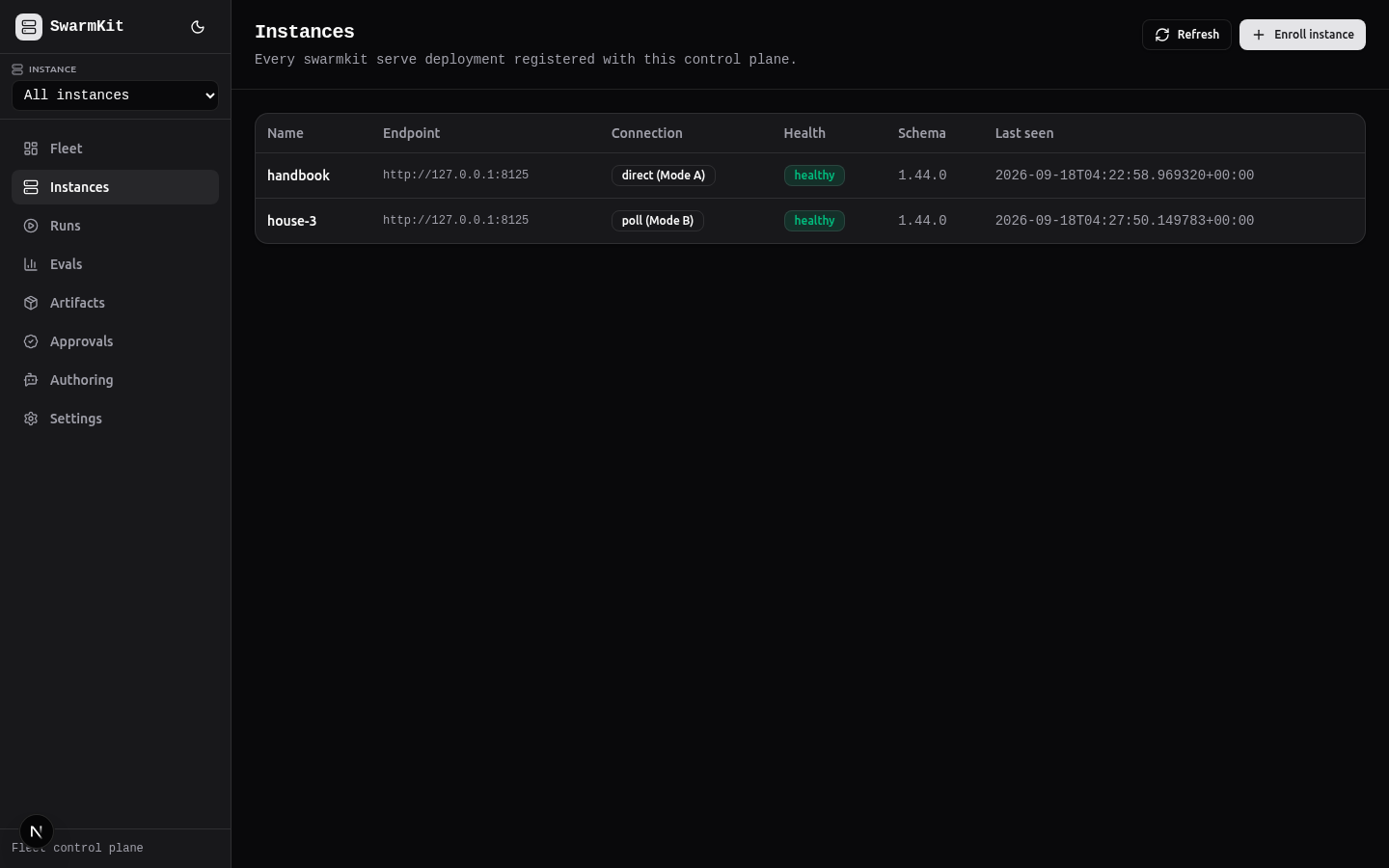
reload and deploy need admin. The UI says "poll mode" wherever a live operation is not
possible, rather than pretending:

{"id": "58024d76ed7b", "name": "handbook", "connection": "direct", "tier": "run", "health": "healthy"}
{"id": "7b21754a0d77", "name": "house-3",  "connection": "poll",   "tier": "run", "health": "healthy"}
8. Make it observable¶
# each instance — env vars, or ~/.swarmkit/config.yaml for a persistent setting
export SWARMKIT_OTEL_EXPORTER=otlp
export SWARMKIT_OTEL_ENDPOINT=http://collector:4318/v1/traces
Traces (one per run, one span per agent and tool call) go to Jaeger; swarmkit_runs_total,
governance decisions and token counts to Prometheus; deploy/observability ships the collector and
a Grafana SwarmKit Fleet dashboard, and the panel's Settings page links to both when started
with --jaeger-url / --grafana-url. The Runs page's per-run detail — the span waterfall — is
fetched live from the instance that ran it; nothing in the trace is stored on the panel.
Run it¶
The whole demo fleet — observability, control plane, three example instances, enrolled automatically — is one compose file:
cp deploy/fleet/.env.example deploy/fleet/.env      # set SWARMKIT_CONTROL_PLANE_SECRET_KEY
docker compose -f deploy/fleet/docker-compose.yml up -d --build
curl -s http://localhost:8080/api/instances | python -m json.tool
| Service | URL |
|---|---|
| Fleet UI | http://localhost:8080 |
| Jaeger | http://localhost:16686 |
| Grafana | http://localhost:3001 |
| Prometheus | http://localhost:9090 |
Then just demo-fleet-identity (the instance's signed identity, enrolment and key rotation) and
just demo-signed-deploy (a registry deploy: signed, human-gated, audited on both sides).
What happened¶
- No instance handed over authority: the panel holds a membership key with a scope, and every
mutation it triggers is a request the instance authorises with the acting principal — Alice's
approval counted, Alice's approval as product-lead refused; and with
approve-as, the people who signed in, not the key the panel holds. - A deploy is a signed, content-addressed push that writes your file back as you wrote it, and drift is a hash comparison against what the last sync observed.
- The fleet learns what its agents lack from the instances themselves:
skill.gap→/gaps→ the ranked list a person turns into a proposal. - A NAT'd instance is a first-class member through an outbound connector and a command queue, with the same verb table and tiers as the runtime.
Learn more¶
- Fleet control plane · Fleet compose
design/details/control-plane/27-fleet-signals-and-kinds.md— the September 2026 audit and what it changed;28-operator-identity-to-instance.md— approve as yourselfdeploy/control-plane/README.md— auth, runbook, backup;deploy/fleet/README.md— the demo fleet- Telemetry configuration · Serve mode (the
/fleet/*seam)